Saturday, January 25, 2014

Creat New PPPOE Connection In Windows 2000 All Editions Tutorials And Notes

PPPOE Connection Definition

IT KI DUNIYAA | Reading for information | Needs of All Students And learners

Source:- Google.com.pk

Define PPPOE Connection?

The Point-to-Point Protocol over Ethernet (PPPoE) is a network protocol for encapsulating PPP frames inside Ethernet frames. It appeared at the turn of the century, in the context of the boom of the DSL as the solution for tunneling packets over the DSL connection to the ISP's IP network, and from there to the rest of the Internet. A 2005 networking book noted that "Most DSL providers use PPPoE, which provides authentication, encryption, and compression." Typical use of PPPoE involves leveraging the PPP facilities for authenticating the user with a username and password, predominately via the PAP protocol and less often via CHAP.
IT KI DUNIYAA | Reading for information | Needs of All Students And learners


IT KI DUNIYAA | Reading for information | Needs of All Students And learners
On the customer-premises equipment, PPPoE may be implemented either in a unified residential gateway device that handles both DSL modem and IP routing functions or in the case of a simple DSL modem (without routing support), PPPoE may be handled behind it on a separate Ethernet-only router or even directly on a user's computer. (Support for PPPoE is present in most operating systems, ranging from Windows XP, Linux to Mac OS X.) More recently, some GPON-based (instead of DSL-based) residential gateways also use PPPoE, although the status of PPPoE in the GPON standards is marginal.

PPPoE was developed by UUNET, Redback Networks and RouterWare (now Wind River Systems) dead link and is available as an informational RFC 2516.

In the world of DSL, PPPoE was commonly understood to be running on top of ATM (of DSL) as the underlying transport, although no such limitation exists in the PPPoE protocol itself. Other usage scenarios are sometimes distinguished by tacking as a suffix another underlying transport. For example PPPoEoE, when the transport is Ethernet itself, as in the case of Metro Ethernet networks. (In this notation, the original use of PPPoE would be labeled PPPoEoA, although it should not be confused with PPPoA, which is a different encapsulation protocol.)

PPPoE has been described in some books as a "layer 2.5" protocol, in some rudimentary sense similar to MPLS because it can be used to distinguish different IP flows sharing an Ethernet infrastructure, although the lack of PPPoE switches making routing decision based on PPPoE headers limits applicability in that respect.

Original rationale

In late 1998 the DSL service model had a chicken-and-egg problem. ADSL technology had been proposed a decade earlier. Potential equipment vendors and carriers alike recognized that broadband such as cable modem or DSL would eventually replace dialup service, but the hardware (both customer premises and LEC) faced a significant low-quantity cost barrier. Initial estimates for low-quantity deployment of DSL showed costs in the $300–$500 range for a DSL modem and $300/mo access fee from the telco which was well beyond what a home user would pay. Thus the initial focus was on small & home business customers for whom a T1 line (at the time $800–$1500 per month) was not economical, but who needed more than dialup or ISDN could deliver. If enough of these customers paved the way, quantities would drive the prices down to where the home-use dialup user might be interested: more like $50 for the modem and $50/mo for the access.

Different usage profile

The problem was that small business customers had a different usage profile than a home-use dialup user, including

    connecting an entire LAN to the internet
    providing services on a local LAN accessible from the far side of the connection
    simultaneous access to multiple external data sources, such as a company VPN and a general purpose ISP
    continuous usage throughout the workday, or even around the clock

These requirements didn't lend themselves to the connection establishment lag of a dialup process, nor its one-computer-to-one-ISP model, nor even the many-to-one that NAT + dialup provided. A new model was required.

PPPoE is used mainly either:

    with PPPoE-speaking Internet DSL services where a PPPoE-speaking modem-router (residential gateway) connects to the DSL service. Here both ISP and modem-router need to speak PPPoE. (Note that in this case, the PPPoE-over-DSL side of things is occasionally referred to as PPPoEoA, for ‘PPPoE over ATM’.)
    or when a PPPoE-speaking DSL modem is connected to a PPPoE-speaking Ethernet-only router using an Ethernet cable. For such two-box systems, DSL modem plus Ethernet-only router, PPPoE is now when? the preferred solution.

Time to market: simpler is better

A problem with creating a completely new protocol to fill these needs was time. The equipment was available immediately, as was the service, and a whole new protocol stack (Microsoft at the time was advocating fiber-based atm-cells-to-the-desktop, dead link and L2TP was brewing as well, but was not near completion) would take so long to implement that the window of opportunity might slip by. Several decisions were made to simplify implementation and standardization in an effort to deliver a complete solution quickly.

Reuse existing software stacks

PPPoE hoped to merge the widespread Ethernet infrastructure with the ubiquitous PPP, allowing vendors on both sides of the connection to heavily leverage their existing software and deliver products in the very near term. Essentially all operating systems at the time had a PPP stack, and the design of PPPoE allowed for a simple shim at the line-encoding stage to convert from PPP to PPPoE.

Simplify hardware requirements

Competing WAN technologies (T1, ISDN) required a router on the customer premises. PPPoE used a different Ethernet frame type, which allowed the DSL hardware to function as simply a bridge, passing some frames to the WAN and ignoring the others. Implementation of such a bridge is multiple orders of magnitude simpler than a router.

Informational RFC

RFC 2516 was initially released as an informational (rather than standards-track) RFC for the same reason: the adoption period for a standards-track RFC was prohibitively long.

Success

PPPoE was initially designed to provide a small LAN with individual independent connections to the internet at large, but also such that the protocol itself would be lightweight enough that it wouldn't impinge on the hoped-for home usage market when it finally arrived. While success on the second matter may be debated (some complain that 8 bytes per packet is too much) PPPoE clearly succeeded in bringing sufficient volume to drive the price for service down to what a home user would pay. It remains the dominant DSL connectivity mechanism as of 2011, more than a decade later.

PPPoE stages

The PPPoE has two distinct stages:

PPPoE discovery

Since traditional PPP connections are established between two end points over a serial link or over an ATM virtual circuit that has already been established during dial-up, all PPP frames sent on the wire are sure to reach the other end. But Ethernet networks are multi-access where each node in the network can access every other node. An Ethernet frame contains the hardware address of the destination node (MAC address). This helps the frame reach the intended destination.

Hence before exchanging PPP control packets to establish the connection over Ethernet, the MAC address of the two end points should be known to each other so that they can be encoded in these control packets. The PPPoE Discovery stage does exactly this. In addition it also helps establish a Session ID that can be used for further exchange of packets.

PPP session

Once the MAC address of the peer is known and a session has been established, the Session stage.

PPPoE Discovery (PPPoED)

Although traditional PPP is a peer-to-peer protocol, PPPoE is inherently a client-server relationship since multiple hosts can connect to a service provider over a single physical connection.

The Discovery process consists of four steps between the host computer which acts as the client and the access concentrator at the internet service provider's end acts as the server. They are outlined below. The fifth and last step is the way to close an existing session.

Client to server: Initiation (PADI)

PADI stands for PPPoE Active Discovery Initiation.

If a user wants to "dial up" to the Internet using DSL, then his computer first must find the DSL access concentrator (DSL-AC) at the user's Internet service provider's point of presence (POP). Communication over Ethernet is only possible via MAC addresses. As the computer does not know the MAC address of the DSL-AC, it sends out a PADI packet via an Ethernet broadcast (MAC: ff:ff:ff:ff:ff:ff). This PADI packet contains the MAC address of the computer sending it.
IT KI DUNIYAA | Reading for information | Needs of All Students And learners
Example of a PADI-packet:

IT KI DUNIYAA | Reading for information | Needs of All Students And learners
Src. (=source) holds the MAC address of the computer sending the PADI.
Dst. (=destination) is the Ethernet broadcast address.
The PADI packet can be received by more than one DSL-AC. Only DSL-AC equipment that can serve the "Service-Name" tag should reply.

Server to client: Offer (PADO)

PADO stands for PPPoE Active Discovery Offer.

Once the user's computer has sent the PADI packet, the DSL-AC replies with a PADO packet, using the MAC address supplied in the PADI. The PADO packet contains the MAC address of the DSL-AC, its name (e.g. LEIX11-erx for the T-Com DSL-AC in Leipzig) and the name of the service. If more than one POP's DSL-AC replies with a PADO packet, the user's computer selects the DSL-AC for a particular POP using the supplied name or service.
IT KI DUNIYAA | Reading for information | Needs of All Students And learners
Here is an example of a PADO packet:

IT KI DUNIYAA | Reading for information | Needs of All Students And learners
AC-Name -> String data holds the AC name, in this case “Ipzbr001” (the Arcor DSL-AC in Leipzig)
Src. holds the MAC address of the DSL-AC.
The MAC address of the DSL-AC also reveals the manufacturer of the DSL-AC (in this case Nortel Networks).

Client to server: request (PADR)

PADR stands for PPPoE active discovery request.

A PADR packet is sent by the user's computer to the DSL-AC following receipt of an acceptable PADO packet from the DSL-AC. It confirms acceptance of the offer of a PPPoE connection made by the DSL-AC issuing the PADO packet.

Server to client: session-confirmation (PADS)

PADS stands for PPPoE Active Discovery Session-confirmation.

The PADR packet above is confirmed by the DSL-AC with a PADS packet, and a Session ID is given out with it. The connection with the DSL-AC for that POP has now been fully established.

Either end to other end: termination (PADT)

PADT stands for PPPoE Active Discovery Termination. This packet terminates the connection to the POP. It may be sent either from the user's computer or from the DSL-AC.

Protocol overhead

PPPoE has the highest overhead DSL delivery method.

On ATM/DSL (aka PPPoEoA): The amount of overhead added by PPPoEoA on the DSL side of things depends on the packet size because of (i) the absorbing effect of ATM cell-padding which completely cancels out overheads of PPPoEoA in some cases, (ii) the PPPoE overhead can cause an entire additional 53 byte ATM cell to be required, and (iii) IP fragmentation can be induced (which also invokes the first two effects). However ignoring ATM and IP fragmentation for the moment, the basic additional protocol header overheads for AAL5 payload are typically: 2 bytes (for PPP) + 6 (for PPPoE) + 18 (Ethernet framing, variable) + 10 (RFC 2684, variable) = 36 bytes. For very small packets this overhead is even greater because of Ethernet frame padding. However more realistically, the typical DSL/ATM overhead is either zero or 53 bytes as in case (ii) where the ATM cell payload maximum of 48 bytes is exceeded, so requiring an additional 53 byte cell. The 36 byte figure deduced earlier can be slightly reduced by various means: discarding Ethernet FCS loses another 4 bytes, for example, bringing the total down to 32. Compare this with a vastly more header-efficient protocol, PPPoA, with a fixed 10 byte overhead inside the AAL5 payload (i.e. on the DSL side).

On Ethernet: On the Ethernet side of things, additional overhead for PPPoE over Ethernet is a fixed 2 + 6 = 8 bytes as before, unless IP fragmentation is produced.

MTU/MRU

When the DSL modem sends and receives PPPoE-containing Ethernet frames across the Ethernet link to the router (or PPPoE-speaking single PC), there is an overhead of 8 bytes (2 for PPP, 6 for PPPoE) added within the payload of the Ethernet frame. This added overhead usually means that a reduced limit (so-called ‘MTU’ or ‘MRU’) of 1492 bytes is imposed on the length of IP packets sent or received, as opposed to the usual 1500 bytes for Ethernet networks. Some devices support RFC 4638, which allows a 1508 byte l Ethernet frame, sometimes called ‘baby jumbo frames’, thus allowing a full 1500 byte payload to be transported over a PPPoE session. This is advantageous because of the many companies who (incorrectly) block all ICMP traffic from exiting their network. This stops Path MTU discovery from working correctly and can cause problems for people accessing these networks with a MRU of less than 1500 bytes.

How PPPoE fits in the DSL Internet access architecture

The transport protocol used on the telephone network is ATM. The DSL modem encapsulates PPP packets inside ATM cells and sends them over the WAN. There are several encapsulation methods.

PPPoEoA

The diagram depicts one of two possible scenarios involving the use of PPPoE to connect an Ethernet router to a DSL modem (both PPPoE-speaking) in order to connect a LAN to a PPPoE-speaking ISP. Here three devices need to speak PPPoE; router, modem and a Broadband Remote Access Server located at the service provider or ISP's office. On the diagram, the deep protocol stack we see between modem and DSLAM is a picture of what we have termed ‘’PPPoEoA in this article. (Note that other authors, such as some Cisco publications also use the term ‘PPPoEoA’ but not necessarily with exactly the same meaning.)

Example: The DSL modem receives an Internet-bound Ethernet frame from the router which contains a PPP frame inside a PPPoE packet. The modem sends on the PPPoE packet toward the DSLAM by wrapping it in several protocol layers as follows: Typically in this PPPoEoA topology, the DSL modem wraps the PPPoE packet within Ethernet frame-wrapping as described in RFC 2684, second part, ‘bridged protocols’, before sending it on to the DSLAM within an AAL5-encapsulated packet over ATM.

This Ethernet frame wrapping around the PPPoE packets represents a significant and quite unnecessary overhead and can be avoided by using the alternate scheme discussed in the next section.
IT KI DUNIYAA | Reading for information | Needs of All Students And learners

IT KI DUNIYAA | Reading for information | Needs of All Students And learners
Notes:

    Where the diagram shows ‘(IP)’ this could be various kinds of PPP payload, IPv4 and IPv6 being just examples, but the payload need by no means be in any way IP-related. It can be anything that PPP knows how to encapsulate.
    On the diagram, the area shown as ‘backbone’ could also be ATM on older networks, however its architecture is service-provider dependant. There would be additional columns in this area in a more detailed service-provider specific diagram.
    The diagram does not show the whole of the ISP-side. The PPP connection typically terminates at a server further off the right hand side, not shown. The right hand portion of the diagram shown as backbone would typically be PPP/L2TP/IP.
    Where the diagram says ‘router’, a PPPoE-speaking single host PC could be an alternative to an Ethernet router, acting as a PPPoE client and PPP endpoint.


PPPoE to PPPoA

In this diagram, the scenario is the same as before with two exceptions: (i) A more efficient modem architecture is shown, the modem being a PPPoE-to-PPPoA protocol converter. (ii) The service provider offers a PPPoA service and does not understand PPPoE. There is no PPPoEoA in this protocol chain.

In this alternative topology, PPPoE is merely a means of connecting DSL-modems to an Ethernet-only router (again, or to a single host PC). Here it is not concerned with the mechanism employed by an ISP to offer broadband services.

When transmitting packets bound for the internet, the PPPoE-speaking Ethernet router sends Ethernet frames to the (also PPPoE-speaking) DSL modem. The modem extracts PPP frames from within the received PPPoE frames, and sends the PPP frames onwards to the DSLAM by encapsulating them according to RFC 2364 (PPPoA), thus converting PPPoE into PPPoA.
IT KI DUNIYAA | Reading for information | Needs of All Students And learners

IT KI DUNIYAA | Reading for information | Needs of All Students And learners
On the diagram, the area shown as ‘backbone’ could also be ATM on older networks, however its architecture is service provider-dependant. On a more detailed, more service-provider specific diagram there would be additional columns in this area.

Quirks

Since the point to point connection established has a MTU lower than that of standard Ethernet (typically 1492 vs Ethernet's 1500), it can sometimes cause problems when Path MTU Discovery is defeated by poorly configured firewalls. Although higher MTUs are becoming more common in providers' networks, usually the workaround is to use TCP MSS (Maximum Segment Size) "clamping" or "rewrite", whereby the access concentrator rewrites the MSS to ensure TCP peers send smaller datagrams. Although TCP MSS clamping solves the MTU issue for TCP, other protocols such as ICMP and UDP may still be affected.

RFC 4638 allows PPPoE devices to negotiate an MTU of greater than 1492 if the underlying Ethernet layer is capable of jumbo frames.

Some vendors (Cisco and Juniper, for example) distinguish PPPoE,oA from PPPoEoE (PPPoE over Ethernet), which is PPPoE running directly over Ethernet or other IEEE 802 networks or over Ethernet bridged over ATM, in order to distinguish it from PPPoEoA (PPPoE over ATM), which is PPPoE running over an ATM virtual circuit using RFC 2684 and SNAP encapsulation of PPPoE. (PPPoEoA is not the same as Point-to-Point Protocol over ATM (PPPoA), which doesn't use SNAP).

According to a Cisco document "PPPoEoE is a variant of PPPoE where the Layer 2 transport protocol is now Ethernet or 802.1q VLAN instead of ATM. This encapsulation method is generally found in Metro Ethernet or Ethernet digital subscriber line access multiplexer (DSLAM) environments. The common deployment model is that this encapsulation method is typically found in multi-tenant buildings or hotels. By delivering Ethernet to the subscriber, the available bandwidth is much more abundant and the ease of further service delivery is increased."

It is possible to find DSL modems, such as the Draytek Vigor 120, where PPPoE is confined to the ethernet link between a DSL modem and a partnering router, and the ISP does not speak PPPoE at all (but rather PPPoA).

Post-DSL uses and some alternatives in these contexts

A certain method of using PPPoE in conjunction with GPON (which involves creating a VLAN via OMCI) has been patented by ZTE.

PPPoE over GPON is reportedly used by retail service providers such as Internode of Australia's National Broadband Network, Romania's RCS & RDS (for their "Fiberlink" customers — GPON is sold as Ethernet ports in MDUs)., Orange France and Philippines' Globe Telecom. Verizon's FIOS product has uses DHCP in some states and PPPoE in others.

RFC 6934 "Applicability of Access Node Control Mechanism to PON based Broadband Networks", which argues for the use of Access Node Control Protocol in PONs for—among other things—authenticating subscriber access and managing their IP addresses, and the first author of which is a Verizon employee, excludes PPPoE as an acceptable encapsulation for GPON: "The protocol encapsulation on BPON is based on multi-protocol encapsulation over ATM Adaptation Layer 5 (AAL5), defined in RFC2684. This covers PPP over Ethernet (PPPoE, defined in RFC2516) or IP over Ethernet (IPoE). The protocol encapsulation on GPON is always IPoE."

The 10G-PON (XG-PON) standard (G.987) provides for 802.1X mutual authentication of the ONU and OLT, besides the OMCI method carried forward from G.984. G.987 also adds support for authenticating other customer-premises equipment beyond the ONU (e.g. in a MDU), although this is limited to Ethernet ports, also handled via 802.1X. (The ONU is supposed snoop EAP-encapsulated RADIUS messages in this scenario and determine if the authentication was successful or not.) There is some modicum support for PPPoE specified in the OMCI standards, but only in terms of the ONU being able to filter and add VLAN tags for traffic based on its encapsulation (and other parameters), which includes PPPoE among the protocols that ONU must be able to discern.

The Broadband Forum's TR-200 "Using EPON in the Context of TR-101" (2011), which also pertains to 10G-EPON, says "The OLT and the multiple-subscriber ONU MUST be able to perform the PPPoE Intermediate Agent function, as specified in Section 3.9.2/TR-101."

A book on Ethernet in the first mile notes that DHCP can obviously be used instead of PPPoE to configure a host for an IP session, although it points out that DHCP is not a complete replacement for PPPoE if some encapsulation is also desired (although VLAN bridges can fulfill this function) and that furthermore DHCP does not provide (subscriber) authentication, suggesting that IEEE 802.1X is also needed for a "complete solution" sans PPPoE.(This book assumes that PPPoE is leveraged for other features of PPP besides encapsulation, including IPCP for host configuration, and PAP or CHAP for authentication.)

There are security reasons to use PPPoE in a (non-DSL/ATM) shared-medium environment, such as power line communication networks, in order to create separate tunnels for each customer.

ITKiDuniyaa Explains PPPOE In Simple Words

What is PPP and PPPoE?

Point To Point Protocol (PPP) and Point To Point Protocol over Ethernet (PPPoE) are network protocols that allow data communication between two network entities or points. Throughout the documentation for both protocols, points are referred to as nodes, computers, or hosts. The protocols are similar in design with a major difference - PPPoE is encapsulated in Ethernet frames. Both protocols exist at the network access layer (also known as the data link layer) that supports network layer protocols including IPv4 and IPv6.

Point To Point Protocol (PPP)

PPP was first proposed as a standard by the Internet Engineering Task Force (IETF) in 1989 and became a working standard in 1994. The IETF specification for PPP is RFC 1661. PPP is a protocol most widely used by Internet service providers (ISPs) to enable dial up connections to the Internet. PPP facilitates the transmission of data packets between point to point links. Originally designed to work with serial connections, PPP was adopted by ISPs to provide dial up Internet access. PPP can be encapsulated in a number of data link layer protocols, including Ethernet (PPPoE) and Asynchronous Transfer Mode (PPPoA).

PPP uses Link Control Protocol (LCP) to establish a session between a user's computer and an ISP. LCP is responsible for determining if the link is acceptable for data transmission. LCP packets are exchanged between multiple network points to determine link characteristics including device identity, packet size, and configuration errors.

PPP supports three types of user authentication protocols that provide varying levels of security. Password Authentication Protocol (PAP) is an access control protocol used to authenticate a user's password on the network access server. The network access server requests a password from the client machine and sends the retrieved password to an authentication server for verification. As an authentication protocol, PAP is considered the least secure because the password is not encrypted in transmission.

Challenge Handshake Authentication Protocol (CHAP) is similar to PAP with several unique characteristics. Instead of requesting a password, the network access server sends a challenge message to the client machine. The challenge message is a random value. The client machine encrypts the challenge message with a user's password and sends the combination back to the access server. The access server forwards the challenge/password combination to the authentication server. The authentication server encrypts the challenge with the user's password stored in the authentication database. If the user's response is a match, the password is considered authentic. CHAP uses the model of a shared secret (the user password) to authenticate the user. The use of CHAP is considered a moderately secure method of authentication.

Extensible Authentication Protocol (EAP) is considered an authentication framework used by a number of secure authentication protocols. EAP is most commonly used for authentication on wireless networks.

Point To Point Protocol over Ethernet (PPPoE)

The working standard for the PPPoE protocol was published by the IETF in 1999. The IETF specification for PPPoE is RFC 2516. PPPoE expands the original capability of PPP by allowing a virtual point to point connection over a multipoint Ethernet network architecture. PPPoE is a protocol that is widely used by ISPs to provision digital subscriber line (DSL) high speed Internet services, of which the most popular service is ADSL. The similarity between PPPoE and PPP has led to the widespread adoption of PPPoE as the preferred protocol for implementing high speed Internet access. Service providers can use the same authentication server for both PPP and PPPoE sessions, resulting in a cost savings. PPPoE uses standard methods of encryption, authentication, and compression specified by PPP.

PPPoE is configured as a point to point connection between two Ethernet ports. As a tunneling protocol, PPPoE is used as an effective foundation for the transport of IP packets at the network layer. IP is overlaid over a PPP connection and uses PPP as a virtual dial up connection between points on the network. From the user's perspective, a PPPoE session is initiated by using connection software on the client machine or router. PPPoE session initiation involves the identification of the Media Access Control (MAC) address of the remote device. This process, also known as PPPoE discovery, involves the following steps:

    Initiation - The client software sends a PPPoE Active Discovery Initiation (PADI) packet to the server to intitiate the session.
    Offer - The server responds with a PPPoE Active Discovery Offer (PADO) packet.
    Request - Upon receipt of the PADO packet, the client responds by sending a PPPoE Active Discovery Request (PADR) packet to the server.
    Confirmation - Upon receipt of the PADR packet, the server responds by generating a unique ID for the PPP session and sends it in a PPPoE Active Discovery Session (PADS) confirmation packet to the client.

When a PPPoE session is initiated, the destination IP address is only used when the session is active. The IP address is released after the session is closed, allowing for efficient re-use of IP addresses.

ITKiDuniyaa Explains PPPOE In Short Words

Stands for "Point-to-Point Protocol over Ethernet." PPPoE is a network configuration used for establishing a PPP connection over an Ethernet protocol. It is commonly used for creating DSL Internet connections. Since DSL modems typically connect to computers via an Ethernet connection, a standard dial-up PPP connection cannot be used. Therefore, PPP over Ethernet allows computers to connect to an Internet service provider (ISP) via a DSL modem.

PPPoE is a network configuration option found in the Network control panel (Windows) or the Network system preference (Mac OS X). In order to create a PPPoE connection, you will need to enter the service name provided by the ISP as well as a username and password. This provides a simple way for the ISP to uniquely identify your system and establish your Internet connection. PPPoE can be contrasted to DHCP, which dynamically assigns unique IP addresses to connected systems and is typically used by cable Internet service providers.

The biggest advantage of a PPPoE configuration is that it is easy to set up. It also supports multiple computers on a local area network (LAN). The downside of PPPoE is that it requires additional overhead, or extra data, to be sent over the Internet connection. A standard PPPoE connection adds 8 bytes of data to each packet transmitted. While this is only a small fraction of packets that have an MTU of 1500 bytes, some connections use packets as small as 60 bytes, which means PPPoE adds over 13% overhead. For this reason, many DSL providers now offer DHCP configurations as well.

How to create a PPPoE connection in Windows 2000 All Editions

IT KI DUNIYAA | Reading for information | Needs of All Students And learners
Setting up a PPPoE connection on Windows 2000 All Editions

This tutorial will guide you through how to setup of a PPPoE connection on Windows 2000 All Editions. See Setting up a PPPoE connection for help with other operating systems.

The first step is to download RASPPPoE. You can do this with your alternative backup dialup service if you don't have an alternate Internet connection. Use the "Download and install" link on the left, and you'll want to download the version marked "32-bit release for x86 machines". Once you've completed the download, unzip the file into a temporary directory (such as C:\RASPPPoE).

Copy And Paste On Your Browser Search Bar And Download It
http://www.raspppoe.com/files/RASPPPOE_098B.ZIP
http://www.raspppoe.com/files/RASPPPOE_098B_3COM.ZIP
IF You Have 3Com Lan So Download 3Com Patch And 2nd Patch For All Lan Interface Without 3Com

Click "Start" then "Settings" then "Control Panel", then browse to "Network and Dial-Up Connections"
IT KI DUNIYAA | Reading for information | Needs of All Students And learners
Right-click "Local Area Connection" and select "Properties".
IT KI DUNIYAA | Reading for information | Needs of All Students And learners
In the properties dialogue box, click the "Install" button.
IT KI DUNIYAA | Reading for information | Needs of All Students And learners
In the "Select Network Component Type" window, select "Protocol" and click the "Add" button.
IT KI DUNIYAA | Reading for information | Needs of All Students And learners
 In the "Select Network Protocol" window, click the "Have Disk" button.

In the "Install From Disk" window, either type the name of the temporary directory to which you extracted RasPPPoE, or click the "Browse" button to navigate to it, and then click the "OK" button.

A new window opens, offering the "PPP over Ethernet Protocol" for installation. Click "OK" to start installing the protocol.
IT KI DUNIYAA | Reading for information | Needs of All Students And learners
After the "PPP over Ethernet Protocol" is installed, return to the "Local Area Connection Properties" window and click "Close" to close the window. The protocol is now fully functional, but you still need to create a dialup connection to use it.
IT KI DUNIYAA | Reading for information | Needs of All Students And learners
Click the "Start" button on the taskbar and select "Run" to bring up the "Run" dialogue box. Type raspppoe into the box and click the "OK" button to run the dialup Connection Setup application.
IT KI DUNIYAA | Reading for information | Needs of All Students And learners
 A dialogue box appears with a combo box labelled "Query available PPP over Ethernet Services through Adapter" at the top.

Select the network adaptor to which your broadband modem is connected from the list. If the protocol is only operating on one network adapter, the box will be greyed out, as there is no choice to make. Click the "Query Available Services" button. The application will send out a query for offered services and display the result in the list view below.

Click the "Create a Dial-Up Connection" for the selected "Adapter button".
IT KI DUNIYAA | Reading for information | Needs of All Students And learners
Shortly afterwards, a shortcut to the new dialup connection named "Connection through (adaptor name)" should show up on your desktop.
IT KI DUNIYAA | Reading for information | Needs of All Students And learners
Rename the connection icon to iiNet ADSL Connection.
IT KI DUNIYAA | Reading for information | Needs of All Students And learners
 To start the connection to the Internet, double-click the "iiNet ADSL Connection" icon. If it's the first time you've started the connection, you'll need to fill in the following fields:

    Username: Enter your full iiNet username, e.g. Admin.Mubeen@itkiduniyaa.blogspot.com
    Password: Enter your password as supplied by iiNet

Click the "Dial" button to connect to the Internet.
That’s all……I hope i clear Our self  itkiduniyaa.blogspot.com
IT KI DUNIYAA | Reading for information | Needs of All Students And learners

Friday, January 24, 2014

Increase Internet Speed In All Microsoft O/S Tutorials And Notes

Increase Internet Speed By Upto 20%

IT KI DUNIYAA | Reading for information | Needs of All Students And learners

Source:- Google.com.pk

Define Internet?

The Internet is a global system of interconnected computer networks that use the standard Internet protocol suite (TCP/IP) to serve several billion users worldwide. It is a network of networks that consists of millions of private, public, academic, business, and government networks, of local to global scope, that are linked by a broad array of electronic, wireless and optical networking technologies. The Internet carries an extensive range of information resources and services, such as the inter-linked hypertext documents of the World Wide Web (WWW), the infrastructure to support email, and peer-to-peer networks.

Most traditional communications media including telephone, music, film, and television are being reshaped or redefined by the Internet, giving birth to new services such as voice over Internet Protocol (VoIP) and Internet Protocol television (IPTV). Newspaper, book and other print publishing are adapting to website technology, or are reshaped into blogging and web feeds. The Internet has enabled and accelerated new forms of human interactions through instant messaging, Internet forums, and social networking. Online shopping has boomed both for major retail outlets and small artisans and traders. Business-to-business and financial services on the Internet affect supply chains across entire industries.

The origins of the Internet reach back to research commissioned by the United States government in the 1960s to build robust, fault-tolerant communication via computer networks. While this work, together with work in the United Kingdom and France, led to important precursor networks, they were not the Internet. There is no consensus on the exact date when the modern Internet came into being, but sometime in the early to mid-1980s is considered reasonable.

The funding of a new U.S. backbone by the National Science Foundation in the 1980s, as well as private funding for other commercial backbones, led to worldwide participation in the development of new networking technologies, and the merger of many networks. Though the Internet has been widely used by academia since the 1980s, the commercialization of what was by the 1990s an international network resulted in its popularization and incorporation into virtually every aspect of modern human life. As of June 2012, more than 2.4 billion people—over a third of the world's human population—have used the services of the Internet; approximately 100 times more people than were using it in 1995. Internet use grew rapidly in the West from the mid-1990s to early 2000s and from the late 1990s to present in the developing world. In 1994 only 3% of American classrooms had the Internet while by 2002 92% did.

The Internet has no centralized governance in either technological implementation or policies for access and usage; each constituent network sets its own policies. Only the overreaching definitions of the two principal name spaces in the Internet, the Internet Protocol address space and the Domain Name System, are directed by a maintainer organization, the Internet Corporation for Assigned Names and Numbers (ICANN). The technical underpinning and standardization of the core protocols (IPv4 and IPv6) is an activity of the Internet Engineering Task Force (IETF), a non-profit organization of loosely affiliated international participants that anyone may associate with by contributing technical expertise.

Terminology

The Internet, referring to the specific global system of interconnected IP networks, is a proper noun and written with an initial capital letter. In the media and common use it is often not capitalized, viz. the internet. Some guides specify that the word should be capitalized when used as a noun, but not capitalized when used as a verb or an adjective. The Internet is also often referred to as the Net.

Historically the word internet was used, uncapitalized, as early as 1883 as a verb and adjective to refer to interconnected motions. Starting in the early 1970s the term internet was used as a shorthand form of the technical term internetwork, the result of interconnecting computer networks with special gateways or routers. It was also used as a verb meaning to connect together, especially for networks.

The terms Internet and World Wide Web are often used interchangeably in everyday speech; it is common to speak of "going on the Internet" when invoking a web browser to view web pages. However, the Internet is a particular global computer network connecting millions of computing devices; the World Wide Web is just one of many services running on the Internet. The Web is a collection of interconnected documents (web pages) and other web resources, linked by hyperlinks and URLs. In addition to the Web, a multitude of other services are implemented over the Internet, including e-mail, file transfer, remote computer control, newsgroups, and online games. All of these services can be implemented on any intranet, accessible to network users.

The term Interweb is a portmanteau of Internet and World Wide Web typically used sarcastically to parody a technically unsavvy user.

History

Research into packet switching started in the early 1960s and packet switched networks such as Mark I at NPL in the UK, ARPANET, CYCLADES, Merit Network, Tymnet, and Telenet, were developed in the late 1960s and early 1970s using a variety of protocols. The ARPANET in particular led to the development of protocols for internetworking, where multiple separate networks could be joined together into a network of networks.

The first two nodes of what would become the ARPANET were interconnected between Leonard Kleinrock's Network Measurement Center at the UCLA's School of Engineering and Applied Science and Douglas Engelbart's NLS system at SRI International (SRI) in Menlo Park, California, on 29 October 1969. The third site on the ARPANET was the Culler-Fried Interactive Mathematics center at the University of California at Santa Barbara, and the fourth was the University of Utah Graphics Department. In an early sign of future growth, there were already fifteen sites connected to the young ARPANET by the end of 1971. These early years were documented in the 1972 film Computer Networks: The Heralds of Resource Sharing.

Early international collaborations on ARPANET were sparse. For various political reasons, European developers were concerned with developing the X.25 networks. Notable exceptions were the Norwegian Seismic Array (NORSAR) in June 1973, followed in 1973 by Sweden with satellite links to the Tanum Earth Station and Peter T. Kirstein's research group in the UK, initially at the Institute of Computer Science, University of London and later at University College London.

In December 1974, RFC 675 – Specification of Internet Transmission Control Program, by Vinton Cerf, Yogen Dalal, and Carl Sunshine, used the term internet as a shorthand for internetworking and later RFCs repeat this use. Access to the ARPANET was expanded in 1981 when the National Science Foundation (NSF) developed the Computer Science Network (CSNET). In 1982, the Internet Protocol Suite (TCP/IP) was standardized and the concept of a world-wide network of fully interconnected TCP/IP networks called the Internet was introduced.

TCP/IP network access expanded again in 1986 when the National Science Foundation Network (NSFNET) provided access to supercomputer sites in the United States from research and education organizations, first at 56 kbit/s and later at 1.5 Mbit/s and 45 Mbit/s. Commercial Internet service providers (ISPs) began to emerge in the late 1980s and early 1990s. The ARPANET was decommissioned in 1990. The Internet was fully commercialized in the U.S. by 1995 when NSFNET was decommissioned, removing the last restrictions on the use of the Internet to carry commercial traffic. The Internet started a rapid expansion to Europe and Australia in the mid to late 1980s and to Asia in the late 1980s and early 1990s.

Since the mid-1990s the Internet has had a tremendous impact on culture and commerce, including the rise of near instant communication by email, instant messaging, Voice over Internet Protocol (VoIP) "phone calls", two-way interactive video calls, and the World Wide Web with its discussion forums, blogs, social networking, and online shopping sites. Increasing amounts of data are transmitted at higher and higher speeds over fiber optic networks operating at 1-Gbit/s, 10-Gbit/s, or more.

The Internet continues to grow, driven by ever greater amounts of online information and knowledge, commerce, entertainment and social networking. During the late 1990s, it was estimated that traffic on the public Internet grew by 100 percent per year, while the mean annual growth in the number of Internet users was thought to be between 20% and 50%. This growth is often attributed to the lack of central administration, which allows organic growth of the network, as well as the non-proprietary open nature of the Internet protocols, which encourages vendor interoperability and prevents any one company from exerting too much control over the network. As of 31 March 2011, the estimated total number of Internet users was 2.095 billion (30.2% of world population). It is estimated that in 1993 the Internet carried only 1% of the information flowing through two-way telecommunication, by 2000 this figure had grown to 51%, and by 2007 more than 97% of all telecommunicated information was carried over the Internet.

Technology

Protocols

The communications infrastructure of the Internet consists of its hardware components and a system of software layers that control various aspects of the architecture. While the hardware can often be used to support other software systems, it is the design and the rigorous standardization process of the software architecture that characterizes the Internet and provides the foundation for its scalability and success. The responsibility for the architectural design of the Internet software systems has been delegated to the Internet Engineering Task Force (IETF). The IETF conducts standard-setting work groups, open to any individual, about the various aspects of Internet architecture. Resulting discussions and final standards are published in a series of publications, each called a Request for Comments (RFC), freely available on the IETF web site.

The principal methods of networking that enable the Internet are contained in specially designated RFCs that constitute the Internet Standards. Other less rigorous documents are simply informative, experimental, or historical, or document the best current practices (BCP) when implementing Internet technologies.

The Internet standards describe a framework known as the Internet protocol suite. This is a model architecture that divides methods into a layered system of protocols (RFC 1122, RFC 1123). The layers correspond to the environment or scope in which their services operate. At the top is the application layer, the space for the application-specific networking methods used in software applications, e.g., a web browser program uses the client-server application model and many file-sharing systems use a peer-to-peer paradigm. Below this top layer, the transport layer connects applications on different hosts via the network with appropriate data exchange methods. Underlying these layers are the core networking technologies, consisting of two layers.

The internet layer enables computers to identify and locate each other via Internet Protocol (IP) addresses, and allows them to connect to one another via intermediate (transit) networks. Last, at the bottom of the architecture, is a software layer, the link layer, that provides connectivity between hosts on the same local network link, such as a local area network (LAN) or a dial-up connection. The model, also known as TCP/IP, is designed to be independent of the underlying hardware, which the model therefore does not concern itself with in any detail. Other models have been developed, such as the Open Systems Interconnection (OSI) model, but they are not compatible in the details of description or implementation; many similarities exist and the TCP/IP protocols are usually included in the discussion of OSI networking.

The most prominent component of the Internet model is the Internet Protocol (IP), which provides addressing systems (IP addresses) for computers on the Internet. IP enables internetworking and in essence establishes the Internet itself. IP Version 4 (IPv4) is the initial version used on the first generation of today's Internet and is still in dominant use. It was designed to address up to ~4.3 billion (109) Internet hosts. However, the explosive growth of the Internet has led to IPv4 address exhaustion, which entered its final stage in 2011, when the global address allocation pool was exhausted. A new protocol version, IPv6, was developed in the mid-1990s, which provides vastly larger addressing capabilities and more efficient routing of Internet traffic. IPv6 is currently in growing deployment around the world, since Internet address registries (RIRs) began to urge all resource managers to plan rapid adoption and conversion.

IPv6 is not interoperable with IPv4. In essence, it establishes a parallel version of the Internet not directly accessible with IPv4 software. This means software upgrades or translator facilities are necessary for networking devices that need to communicate on both networks. Most modern computer operating systems already support both versions of the Internet Protocol. Network infrastructures, however, are still lagging in this development. Aside from the complex array of physical connections that make up its infrastructure, the Internet is facilitated by bi- or multi-lateral commercial contracts (e.g., peering agreements), and by technical specifications or protocols that describe how to exchange data over the network. Indeed, the Internet is defined by its interconnections and routing policies.

Routing

Internet service providers connect customers, which represent the bottom of the routing hierarchy, to customers of other ISPs via other higher or same-tier networks. At the top of the routing hierarchy are the Tier 1 networks, large telecommunication companies which exchange traffic directly with all other Tier 1 networks via peering agreements. Tier 2 networks buy Internet transit from other providers to reach at least some parties on the global Internet, though they may also engage in peering. An ISP may use a single upstream provider for connectivity, or implement multihoming to achieve redundancy. Internet exchange points are major traffic exchanges with physical connections to multiple ISPs.

Computers and routers use routing tables to direct IP packets to the next-hop router or destination. Routing tables are maintained by manual configuration or by routing protocols. End-nodes typically use a default route that points toward an ISP providing transit, while ISP routers use the Border Gateway Protocol to establish the most efficient routing across the complex connections of the global Internet.

Large organizations, such as academic institutions, large enterprises, and governments, may perform the same function as ISPs, engaging in peering and purchasing transit on behalf of their internal networks. Research networks tend to interconnect into large subnetworks such as GEANT, GLORIAD, Internet2, and the UK's national research and education network, JANET.

General structure

The Internet structure and its usage characteristics have been studied extensively. It has been determined that both the Internet IP routing structure and hypertext links of the World Wide Web are examples of scale-free networks.

Many computer scientists describe the Internet as a "prime example of a large-scale, highly engineered, yet highly complex system". The Internet is heterogeneous; for instance, data transfer rates and physical characteristics of connections vary widely. The Internet exhibits "emergent phenomena" that depend on its large-scale organization. For example, data transfer rates exhibit temporal self-similarity. The principles of the routing and addressing methods for traffic in the Internet reach back to their origins in the 1960s when the eventual scale and popularity of the network could not be anticipated. Thus, the possibility of developing alternative structures is investigated. The Internet structure was found to be highly robust to random failures and very vulnerable to high degree attacks.

Governance

The Internet is a globally distributed network comprising many voluntarily interconnected autonomous networks. It operates without a central governing body.

The technical underpinning and standardization of the Internet's core protocols (IPv4 and IPv6) is an activity of the Internet Engineering Task Force (IETF), a non-profit organization of loosely affiliated international participants that anyone may associate with by contributing technical expertise.

To maintain interoperability, the principal name spaces of the Internet are administered by the Internet Corporation for Assigned Names and Numbers (ICANN), headquartered in Marina del Rey, California. ICANN is the authority that coordinates the assignment of unique identifiers for use on the Internet, including domain names, Internet Protocol (IP) addresses, application port numbers in the transport protocols, and many other parameters. Globally unified name spaces, in which names and numbers are uniquely assigned, are essential for maintaining the global reach of the Internet. ICANN is governed by an international board of directors drawn from across the Internet technical, business, academic, and other non-commercial communities. ICANN's role in coordinating the assignment of unique identifiers distinguishes it as perhaps the only central coordinating body for the global Internet.

Allocation of IP addresses is delegated to Regional Internet Registries (RIRs):

    African Network Information Center (AfriNIC) for Africa
    American Registry for Internet Numbers (ARIN) for North America
    Asia-Pacific Network Information Centre (APNIC) for Asia and the Pacific region
    Latin American and Caribbean Internet Addresses Registry (LACNIC) for Latin America and the Caribbean region
    Réseaux IP Européens - Network Coordination Centre (RIPE NCC) for Europe, the Middle East, and Central Asia


The National Telecommunications and Information Administration, an agency of the United States Department of Commerce, continues to have final approval over changes to the DNS root zone.

The Internet Society (ISOC) was founded in 1992, with a mission to "assure the open development, evolution and use of the Internet for the benefit of all people throughout the world". Its members include individuals (anyone may join) as well as corporations, organizations, governments, and universities. Among other activities ISOC provides an administrative home for a number of less formally organized groups that are involved in developing and managing the Internet, including: the Internet Engineering Task Force (IETF), Internet Architecture Board (IAB), Internet Engineering Steering Group (IESG), Internet Research Task Force (IRTF), and Internet Research Steering Group (IRSG).

On 16 November 2005, the United Nations-sponsored World Summit on the Information Society, held in Tunis, established the Internet Governance Forum (IGF) to discuss Internet-related issues.

Modern uses

The Internet allows greater flexibility in working hours and location, especially with the spread of unmetered high-speed connections. The Internet can be accessed almost anywhere by numerous means, including through mobile Internet devices. Mobile phones, datacards, handheld game consoles and cellular routers allow users to connect to the Internet wirelessly. Within the limitations imposed by small screens and other limited facilities of such pocket-sized devices, the services of the Internet, including email and the web, may be available. Service providers may restrict the services offered and mobile data charges may be significantly higher than other access methods.

Educational material at all levels from pre-school to post-doctoral is available from websites. Examples range from CBeebies, through school and high-school revision guides and virtual universities, to access to top-end scholarly literature through the likes of Google Scholar. For distance education, help with homework and other assignments, self-guided learning, whiling away spare time, or just looking up more detail on an interesting fact, it has never been easier for people to access educational information at any level from anywhere. The Internet in general and the World Wide Web in particular are important enablers of both formal and informal education.

The low cost and nearly instantaneous sharing of ideas, knowledge, and skills has made collaborative work dramatically easier, with the help of collaborative software. Not only can a group cheaply communicate and share ideas but the wide reach of the Internet allows such groups more easily to form. An example of this is the free software movement, which has produced, among other things, Linux, Mozilla Firefox, and OpenOffice.org. Internet chat, whether using an IRC chat room, an instant messaging system, or a social networking website, allows colleagues to stay in touch in a very convenient way while working at their computers during the day. Messages can be exchanged even more quickly and conveniently than via email. These systems may allow files to be exchanged, drawings and images to be shared, or voice and video contact between team members.

Content management systems allow collaborating teams to work on shared sets of documents simultaneously without accidentally destroying each other's work. Business and project teams can share calendars as well as documents and other information. Such collaboration occurs in a wide variety of areas including scientific research, software development, conference planning, political activism and creative writing. Social and political collaboration is also becoming more widespread as both Internet access and computer literacy spread.

The Internet allows computer users to remotely access other computers and information stores easily, wherever they may be. They may do this with or without computer security, i.e. authentication and encryption technologies, depending on the requirements. This is encouraging new ways of working from home, collaboration and information sharing in many industries. An accountant sitting at home can audit the books of a company based in another country, on a server situated in a third country that is remotely maintained by IT specialists in a fourth. These accounts could have been created by home-working bookkeepers, in other remote locations, based on information emailed to them from offices all over the world. Some of these things were possible before the widespread use of the Internet, but the cost of private leased lines would have made many of them infeasible in practice. An office worker away from their desk, perhaps on the other side of the world on a business trip or a holiday, can access their emails, access their data using cloud computing, or open a remote desktop session into their office PC using a secure Virtual Private Network (VPN) connection on the Internet. This can give the worker complete access to all of their normal files and data, including email and other applications, while away from the office. It has been referred to among system administrators as the Virtual Private Nightmare, because it extends the secure perimeter of a corporate network into remote locations and its employees' homes.

Services

World Wide Web

Many people use the terms Internet and World Wide Web, or just the Web, interchangeably, but the two terms are not synonymous. The World Wide Web is only one of hundreds of services used on the Internet. The Web is a global set of documents, images and other resources, logically interrelated by hyperlinks and referenced with Uniform Resource Identifiers (URIs). URIs symbolically identify services, servers, and other databases, and the documents and resources that they can provide. Hypertext Transfer Protocol (HTTP) is the main access protocol of the World Wide Web. Web services also use HTTP to allow software systems to communicate in order to share and exchange business logic and data.

World Wide Web browser software, such as Microsoft's Internet Explorer, Mozilla Firefox, Opera, Apple's Safari, and Google Chrome, lets users navigate from one web page to another via hyperlinks embedded in the documents. These documents may also contain any combination of computer data, including graphics, sounds, text, video, multimedia and interactive content that runs while the user is interacting with the page. Client-side software can include animations, games, office applications and scientific demonstrations. Through keyword-driven Internet research using search engines like Yahoo! and Google, users worldwide have easy, instant access to a vast and diverse amount of online information. Compared to printed media, books, encyclopedias and traditional libraries, the World Wide Web has enabled the decentralization of information on a large scale.

The Web has also enabled individuals and organizations to publish ideas and information to a potentially large audience online at greatly reduced expense and time delay. Publishing a web page, a blog, or building a website involves little initial cost and many cost-free services are available. Publishing and maintaining large, professional web sites with attractive, diverse and up-to-date information is still a difficult and expensive proposition, however. Many individuals and some companies and groups use web logs or blogs, which are largely used as easily updatable online diaries. Some commercial organizations encourage staff to communicate advice in their areas of specialization in the hope that visitors will be impressed by the expert knowledge and free information, and be attracted to the corporation as a result.

One example of this practice is Microsoft, whose product developers publish their personal blogs in order to pique the public's interest in their work. Collections of personal web pages published by large service providers remain popular, and have become increasingly sophisticated. Whereas operations such as Angelfire and GeoCities have existed since the early days of the Web, newer offerings from, for example, Facebook and Twitter currently have large followings. These operations often brand themselves as social network services rather than simply as web page hosts.

Advertising on popular web pages can be lucrative, and e-commerce or the sale of products and services directly via the Web continues to grow.

When the Web began in the 1990s, a typical web page was stored in completed form on a web server, formatted in HTML, ready to be sent to a user's browser in response to a request. Over time, the process of creating and serving web pages has become more automated and more dynamic. Websites are often created using content management or wiki software with, initially, very little content. Contributors to these systems, who may be paid staff, members of a club or other organization or members of the public, fill underlying databases with content using editing pages designed for that purpose, while casual visitors view and read this content in its final HTML form. There may or may not be editorial, approval and security systems built into the process of taking newly entered content and making it available to the target visitors.

Communication

Email is an important communications service available on the Internet. The concept of sending electronic text messages between parties in a way analogous to mailing letters or memos predates the creation of the Internet. Pictures, documents and other files are sent as email attachments. Emails can be cc-ed to multiple email addresses.

Internet telephony is another common communications service made possible by the creation of the Internet. VoIP stands for Voice-over-Internet Protocol, referring to the protocol that underlies all Internet communication. The idea began in the early 1990s with walkie-talkie-like voice applications for personal computers. In recent years many VoIP systems have become as easy to use and as convenient as a normal telephone. The benefit is that, as the Internet carries the voice traffic, VoIP can be free or cost much less than a traditional telephone call, especially over long distances and especially for those with always-on Internet connections such as cable or ADSL. VoIP is maturing into a competitive alternative to traditional telephone service. Interoperability between different providers has improved and the ability to call or receive a call from a traditional telephone is available. Simple, inexpensive VoIP network adapters are available that eliminate the need for a personal computer.

Voice quality can still vary from call to call, but is often equal to and can even exceed that of traditional calls. Remaining problems for VoIP include emergency telephone number dialing and reliability. Currently, a few VoIP providers provide an emergency service, but it is not universally available. Older traditional phones with no "extra features" may be line-powered only and operate during a power failure; VoIP can never do so without a backup power source for the phone equipment and the Internet access devices. VoIP has also become increasingly popular for gaming applications, as a form of communication between players. Popular VoIP clients for gaming include Ventrilo and Teamspeak. Modern video game consoles also offer VoIP chat features.

Data transfer

File sharing is an example of transferring large amounts of data across the Internet. A computer file can be emailed to customers, colleagues and friends as an attachment. It can be uploaded to a website or FTP server for easy download by others. It can be put into a "shared location" or onto a file server for instant use by colleagues. The load of bulk downloads to many users can be eased by the use of "mirror" servers or peer-to-peer networks. In any of these cases, access to the file may be controlled by user authentication, the transit of the file over the Internet may be obscured by encryption, and money may change hands for access to the file. The price can be paid by the remote charging of funds from, for example, a credit card whose details are also passed – usually fully encrypted – across the Internet. The origin and authenticity of the file received may be checked by digital signatures or by MD5 or other message digests. These simple features of the Internet, over a worldwide basis, are changing the production, sale, and distribution of anything that can be reduced to a computer file for transmission. This includes all manner of print publications, software products, news, music, film, video, photography, graphics and the other arts. This in turn has caused seismic shifts in each of the existing industries that previously controlled the production and distribution of these products.

Streaming media is the real-time delivery of digital media for the immediate consumption or enjoyment by end users. Many radio and television broadcasters provide Internet feeds of their live audio and video productions. They may also allow time-shift viewing or listening such as Preview, Classic Clips and Listen Again features. These providers have been joined by a range of pure Internet "broadcasters" who never had on-air licenses. This means that an Internet-connected device, such as a computer or something more specific, can be used to access on-line media in much the same way as was previously possible only with a television or radio receiver. The range of available types of content is much wider, from specialized technical webcasts to on-demand popular multimedia services. Podcasting is a variation on this theme, where – usually audio – material is downloaded and played back on a computer or shifted to a portable media player to be listened to on the move. These techniques using simple equipment allow anybody, with little censorship or licensing control, to broadcast audio-visual material worldwide.

Digital media streaming increases the demand for network bandwidth. For example, standard image quality needs 1 Mbit/s link speed for SD 480p, HD 720p quality requires 2.5 Mbit/s, and the top-of-the-line HDX quality needs 4.5 Mbit/s for 1080p.

Webcams are a low-cost extension of this phenomenon. While some webcams can give full-frame-rate video, the picture either is usually small or updates slowly. Internet users can watch animals around an African waterhole, ships in the Panama Canal, traffic at a local roundabout or monitor their own premises, live and in real time. Video chat rooms and video conferencing are also popular with many uses being found for personal webcams, with and without two-way sound. YouTube was founded on 15 February 2005 and is now the leading website for free streaming video with a vast number of users. It uses a flash-based web player to stream and show video files. Registered users may upload an unlimited amount of video and build their own personal profile. YouTube claims that its users watch hundreds of millions, and upload hundreds of thousands of videos daily.

Access

Common methods of Internet access in homes include dial-up, landline broadband (over coaxial cable, fiber optic or copper wires), Wi-Fi, satellite and 3G/4G technology cell phones. Public places to use the Internet include libraries and Internet cafes, where computers with Internet connections are available. There are also Internet access points in many public places such as airport halls and coffee shops, in some cases just for brief use while standing. Various terms are used, such as "public Internet kiosk", "public access terminal", and "Web payphone". Many hotels now also have public terminals, though these are usually fee-based. These terminals are widely accessed for various usage like ticket booking, bank deposit, online payment etc. Wi-Fi provides wireless access to computer networks, and therefore can do so to the Internet itself. Hotspots providing such access include Wi-Fi cafes, where would-be users need to bring their own wireless-enabled devices such as a laptop or PDA. These services may be free to all, free to customers only, or fee-based. A hotspot need not be limited to a confined location. A whole campus or park, or even an entire city can be enabled.

Grassroots efforts have led to wireless community networks. Commercial Wi-Fi services covering large city areas are in place in London, Vienna, Toronto, San Francisco, Philadelphia, Chicago and Pittsburgh. The Internet can then be accessed from such places as a park bench. Apart from Wi-Fi, there have been experiments with proprietary mobile wireless networks like Ricochet, various high-speed data services over cellular phone networks, and fixed wireless services. High-end mobile phones such as smartphones in general come with Internet access through the phone network. Web browsers such as Opera are available on these advanced handsets, which can also run a wide variety of other Internet software. More mobile phones have Internet access than PCs, though this is not as widely used. An Internet access provider and protocol matrix differentiates the methods used to get online.

An Internet blackout or outage can be caused by local signaling interruptions. Disruptions of submarine communications cables may cause blackouts or slowdowns to large areas, such as in the 2008 submarine cable disruption. Less-developed countries are more vulnerable due to a small number of high-capacity links. Land cables are also vulnerable, as in 2011 when a woman digging for scrap metal severed most connectivity for the nation of Armenia. Internet blackouts affecting almost entire countries can be achieved by governments as a form of Internet censorship, as in the blockage of the Internet in Egypt, whereby approximately 93% of networks were without access in 2011 in an attempt to stop mobilization for anti-government protests.

Users

Overall Internet usage has seen tremendous growth. From 2000 to 2009, the number of Internet users globally rose from 394 million to 1.858 billion. By 2010, 22 percent of the world's population had access to computers with 1 billion Google searches every day, 300 million Internet users reading blogs, and 2 billion videos viewed daily on YouTube.

The prevalent language for communication on the Internet has been English. This may be a result of the origin of the Internet, as well as the language's role as a lingua franca. Early computer systems were limited to the characters in the American Standard Code for Information Interchange (ASCII), a subset of the Latin alphabet.

After English (27%), the most requested languages on the World Wide Web are Chinese (23%), Spanish (8%), Japanese (5%), Portuguese and German (4% each), Arabic, French and Russian (3% each), and Korean (2%). By region, 42% of the world's Internet users are based in Asia, 24% in Europe, 14% in North America, 10% in Latin America and the Caribbean taken together, 6% in Africa, 3% in the Middle East and 1% in Australia/Oceania. The Internet's technologies have developed enough in recent years, especially in the use of Unicode, that good facilities are available for development and communication in the world's widely used languages. However, some glitches such as mojibake (incorrect display of some languages' characters) still remain.

In an American study in 2005, the percentage of men using the Internet was very slightly ahead of the percentage of women, although this difference reversed in those under 30. Men logged on more often, spent more time online, and were more likely to be broadband users, whereas women tended to make more use of opportunities to communicate (such as email). Men were more likely to use the Internet to pay bills, participate in auctions, and for recreation such as downloading music and videos. Men and women were equally likely to use the Internet for shopping and banking. More recent studies indicate that in 2008, women significantly outnumbered men on most social networking sites, such as Facebook and Myspace, although the ratios varied with age. In addition, women watched more streaming content, whereas men downloaded more. In terms of blogs, men were more likely to blog in the first place; among those who blog, men were more likely to have a professional blog, whereas women were more likely to have a personal blog.

According to Euromonitor, by 2020 43.7% of the world's population will be users of the Internet. Splitting by country, in 2011 Iceland, Norway and the Netherlands had the highest Internet penetration by the number of users, with more than 90% of the population with access.

Social impact

The Internet has enabled entirely new forms of social interaction, activities, and organizing, thanks to its basic features such as widespread usability and access.

Social networking and entertainment

Many people use the World Wide Web to access news, weather and sports reports, to plan and book vacations and to find out more about their interests. People use chat, messaging and email to make and stay in touch with friends worldwide, sometimes in the same way as some previously had pen pals. The Internet has seen a growing number of Web desktops, where users can access their files and settings via the Internet.

Social networking websites such as Facebook, Twitter, and MySpace have created new ways to socialize and interact. Users of these sites are able to add a wide variety of information to pages, to pursue common interests, and to connect with others. It is also possible to find existing acquaintances, to allow communication among existing groups of people. Sites like LinkedIn foster commercial and business connections. YouTube and Flickr specialize in users' videos and photographs.

The Internet has been a major outlet for leisure activity since its inception, with entertaining social experiments such as MUDs and MOOs being conducted on university servers, and humor-related Usenet groups receiving much traffic. Today, many Internet forums have sections devoted to games and funny videos; short cartoons in the form of Flash movies are also popular. Over 6 million people use blogs or message boards as a means of communication and for the sharing of ideas. The Internet pornography and online gambling industries have taken advantage of the World Wide Web, and often provide a significant source of advertising revenue for other websites. Although many governments have attempted to restrict both industries' use of the Internet, in general this has failed to stop their widespread popularity.

Another area of leisure activity on the Internet is multiplayer gaming. This form of recreation creates communities, where people of all ages and origins enjoy the fast-paced world of multiplayer games. These range from MMORPG to first-person shooters, from role-playing video games to online gambling. While online gaming has been around since the 1970s, modern modes of online gaming began with subscription services such as GameSpy and MPlayer. Non-subscribers were limited to certain types of game play or certain games. Many people use the Internet to access and download music, movies and other works for their enjoyment and relaxation. Free and fee-based services exist for all of these activities, using centralized servers and distributed peer-to-peer technologies. Some of these sources exercise more care with respect to the original artists' copyrights than others.

Internet usage has been correlated to users' loneliness. Lonely people tend to use the Internet as an outlet for their feelings and to share their stories with others, such as in the "I am lonely will anyone speak to me" thread.

Cybersectarianism is a new organizational form which involves: "highly dispersed small groups of practitioners that may remain largely anonymous within the larger social context and operate in relative secrecy, while still linked remotely to a larger network of believers who share a set of practices and texts, and often a common devotion to a particular leader. Overseas supporters provide funding and support; domestic practitioners distribute tracts, participate in acts of resistance, and share information on the internal situation with outsiders. Collectively, members and practitioners of such sects construct viable virtual communities of faith, exchanging personal testimonies and engaging in collective study via email, on-line chat rooms and web-based message boards."

Cyberslacking can become a drain on corporate resources; the average UK employee spent 57 minutes a day surfing the Web while at work, according to a 2003 study by Peninsula Business Services. Internet addiction disorder is excessive computer use that interferes with daily life. Psychologist Nicolas Carr believe that Internet use has other effects on individuals, for instance improving skills of scan-reading and interfering with the deep thinking that leads to true creativity.

Electronic business

Electronic business (E-business) involves business processes spanning the entire value chain: electronic purchasing and supply chain management, processing orders electronically, handling customer service, and cooperating with business partners. E-commerce seeks to add revenue streams using the Internet to build and enhance relationships with clients and partners.

According to research firm IDC, the size of total worldwide e-commerce, when global business-to-business and -consumer transactions are added together, will equate to $16 trillion in 2013. IDate, another research firm, estimates the global market for digital products and services at $4.4 trillion in 2013. A report by Oxford Economics adds those two together to estimate the total size of the digital economy at $20.4 trillion, equivalent to roughly 13.8% of global sales.

While much has been written of the economic advantages of Internet-enabled commerce, there is also evidence that some aspects of the Internet such as maps and location-aware services may serve to reinforce economic inequality and the digital divide. Electronic commerce may be responsible for consolidation and the decline of mom-and-pop, brick and mortar businesses resulting in increases in income inequality.

Telecommuting

Remote work is facilitated by tools such as groupware, virtual private networks, conference calling, videoconferencing, and Voice over IP (VOIP). It can be efficient and useful for companies as it allows workers to communicate over long distances, saving significant amounts of travel time and cost. As broadband Internet connections become more commonplace, more and more workers have adequate bandwidth at home to use these tools to link their home to their corporate intranet and internal phone networks.

Crowdsourcing

Internet provides a particularly good venue for crowdsourcing (outsourcing tasks to a distributed group of people) since individuals tend to be more open in web-based projects where they are not being physically judged or scrutinized and thus can feel more comfortable sharing.

Crowdsourcing systems are used to accomplish a variety of tasks. For example, the crowd may be invited to develop a new technology, carry out a design task, refine or carry out the steps of an algorithm (see human-based computation), or help capture, systematize, or analyze large amounts of data (see also citizen science).

Wikis have also been used in the academic community for sharing and dissemination of information across institutional and international boundaries. In those settings, they have been found useful for collaboration on grant writing, strategic planning, departmental documentation, and committee work. The United States Patent and Trademark Office uses a wiki to allow the public to collaborate on finding prior art relevant to examination of pending patent applications. Queens, New York has used a wiki to allow citizens to collaborate on the design and planning of a local park.

The English Wikipedia has the largest user base among wikis on the World Wide Web and ranks in the top 10 among all Web sites in terms of traffic.

Politics and political revolutions

The Internet has achieved new relevance as a political tool. The presidential campaign of Howard Dean in 2004 in the United States was notable for its success in soliciting donation via the Internet. Many political groups use the Internet to achieve a new method of organizing in order to carry out their mission, having given rise to Internet activism, most notably practiced by rebels in the Arab Spring.

The New York Times suggested that social media websites, such as Facebook and Twitter, helped people organize the political revolutions in Egypt where it helped certain classes of protesters organize protests, communicate grievances, and disseminate information.

The potential of the Internet as a civic tool of communicative power was thoroughly explored by Simon R. B. Berdal in his thesis of 2004:

    As the globally evolving Internet provides ever new access points to virtual discourse forums, it also promotes new civic relations and associations within which communicative power may flow and accumulate. Thus, traditionally ... national-embedded peripheries get entangled into greater, international peripheries, with stronger combined powers... The Internet, as a consequence, changes the topology of the "centre-periphery" model, by stimulating conventional peripheries to interlink into "super-periphery" structures, which enclose and "besiege" several centres at once.

Berdal, therefore, extends the Habermasian notion of the Public sphere to the Internet, and underlines the inherent global and civic nature that intervowen Internet technologies provide. To limit the growing civic potential of the Internet, Berdal also notes how "self-protective measures" are put in place by those threatened by it:

    If we consider China’s attempts to filter "unsuitable material" from the Internet, most of us would agree that this resembles a self-protective measure by the system against the growing civic potentials of the Internet. Nevertheless, both types represent limitations to "peripheral capacities". Thus, the Chinese government tries to prevent communicative power to build up and unleash (as the 1989 Tiananmen Square uprising suggests, the government may find it wise to install "upstream measures"). Even though limited, the Internet is proving to be an empowering tool also to the Chinese periphery: Analysts believe that Internet petitions have influenced policy implementation in favour of the public’s online-articulated will ...

Philanthropy

The spread of low-cost Internet access in developing countries has opened up new possibilities for peer-to-peer charities, which allow individuals to contribute small amounts to charitable projects for other individuals. Websites, such as DonorsChoose and GlobalGiving, allow small-scale donors to direct funds to individual projects of their choice.

A popular twist on Internet-based philanthropy is the use of peer-to-peer lending for charitable purposes. Kiva pioneered this concept in 2005, offering the first web-based service to publish individual loan profiles for funding. Kiva raises funds for local intermediary microfinance organizations which post stories and updates on behalf of the borrowers. Lenders can contribute as little as $25 to loans of their choice, and receive their money back as borrowers repay. Kiva falls short of being a pure peer-to-peer charity, in that loans are disbursed before being funded by lenders and borrowers do not communicate with lenders themselves.

However, the recent spread of low cost Internet access in developing countries has made genuine international person-to-person philanthropy increasingly feasible. In 2009 the US-based nonprofit Zidisha tapped into this trend to offer the first person-to-person microfinance platform to link lenders and borrowers across international borders without intermediaries. Members can fund loans for as little as a dollar, which the borrowers then use to develop business activities that improve their families' incomes while repaying loans to the members with interest. Borrowers access the Internet via public cybercafes, donated laptops in village schools, and even smart phones, then create their own profile pages through which they share photos and information about themselves and their businesses. As they repay their loans, borrowers continue to share updates and dialogue with lenders via their profile pages. This direct web-based connection allows members themselves to take on many of the communication and recording tasks traditionally performed by local organizations, bypassing geographic barriers and dramatically reducing the cost of microfinance services to the entrepreneurs.

Surveillance

The vast majority of computer surveillance involves the monitoring of data and traffic on the Internet. In the United States for example, under the Communications Assistance For Law Enforcement Act, all phone calls and broadband internet traffic (emails, web traffic, instant messaging, etc.) are required to be available for unimpeded real-time monitoring by Federal law enforcement agencies.

Packet capture (also sometimes referred to as “packet sniffing”) is the monitoring of data traffic on a computer network. Computers communicate over the Internet by breaking up messages (emails, images, videos, web pages, files, etc.) into small chunks called "packets", which are routed through a network of computers, until they reach their destination, where they are assembled back into a complete "message" again. Packet Capture Appliance intercepts these packets as they are travelling through the network, in order to examine their contents using other programs. A packet capture is an information gathering tool, but not an analysis tool. That is it gathers "messages" but it does not analyze them and figure out what they mean. Other programs are needed to perform traffic analysis and sift through intercepted data looking for important/useful information. Under the Communications Assistance For Law Enforcement Act all U.S. telecommunications providers are required to install packet sniffing technology to allow Federal law enforcement and intelligence agencies to intercept all of their customers' broadband Internet and voice over Internet protocol (VoIP) traffic.

There is far too much data gathered by these packet sniffers for human investigators to manually search through all of it. So automated Internet surveillance computers sift through the vast amount of intercepted Internet traffic, and filter out and report to human investigators those bits of information which are "interesting"—such as the use of certain words or phrases, visiting certain types of web sites, or communicating via email or chat with a certain individual or group. Billions of dollars per year are spent, by agencies such as the Information Awareness Office, NSA, and the FBI, to develop, purchase, implement, and operate systems which intercept and analyze all of this data, and extract only the information which is useful to law enforcement and intelligence agencies.

Similar systems are now operated by Iranian secret police to identify and suppress dissidents. All required hardware and software has been allegedly installed by German Siemens AG and Finnish Nokia.

Censorship

Some governments, such as those of Burma, Iran, North Korea, the Mainland China, Saudi Arabia, and the United Arab Emirates restrict what people in their countries can access on the Internet, especially political and religious content. This is accomplished through software that filters domains and content so that they may not be easily accessed or obtained without elaborate circumvention.

In Norway, Denmark, Finland, and Sweden, major Internet service providers have voluntarily, possibly to avoid such an arrangement being turned into law, agreed to restrict access to sites listed by authorities. While this list of forbidden URLs is supposed to contain addresses of only known child pornography sites, the content of the list is secret. Many countries, including the United States, have enacted laws against the possession or distribution of certain material, such as child pornography, via the Internet, but do not mandate filtering software. There are many free and commercially available software programs, called content-control software, with which a user can choose to block offensive websites on individual computers or networks, in order to limit a child's access to pornographic materials or depiction of violence.

ITKiDuniyaa Explains Internet In Simple Words

What Is Internet?

The Internet is a global network connecting millions of computers. More than 100 countries are linked into exchanges of data, news and opinions. According to Internet World Stats, as of December 31, 2011 there was an estimated 2,267,233,742 Internet users worldwide. This represents 32.7% of the world's population.

Unlike online services, which are centrally controlled, the Internet is decentralized by design. Each Internet computer, called a host, is independent. Its operators can choose which Internet services to use and which local services to make available to the global Internet community. Remarkably, this anarchy by design works exceedingly well. There are a variety of ways to access the Internet. Most online services offer access to some Internet services. It is also possible to gain access through a commercial Internet Service Provider (ISP).

Who Owns the Internet?

No one actually owns the Internet, and no single person or organization controls the Internet in its entirety. The Internet is more of a concept than an actual tangible entity, and it relies on a physical infrastructure that connects networks to other networks.

ITKiDuniyaa Explains Internet In Short Words

Believe it or not, the Internet was created way back in 1969, during the Cold War, by the United States military. It was meant to be a "nuke-proof" communications network. Today, the Internet spreads across the globe and consists of countless networks and computers, allowing millions of people to share information. Data that travels long distances on the Internet is transferred on huge lines known collectively as the Internet backbone. The Internet is now maintained by the major Internet service providers such as MCI Worldcom, Sprint, GTE, ANS, and UUNET. Because these providers make huge amounts of revenue off the Internet, they are motivated to maintain consistent and fast connections which benefits everyday Internet users like you and me.

Many people think the Internet and the World Wide Web are the same thing. They're not! The World Wide Web is what you are browsing right now. It is one of the many features of the Internet. E-mail, FTP, and Instant Messaging are also features of the Internet.

NOTES For Increase Your Internet Speed In All Microsoft Operating Systems

How To Increase Internet Speed In Windows 2000/2003/XP/Vista/7/8/8.1

IT KI DUNIYAA | Reading for information | Needs of All Students And learners
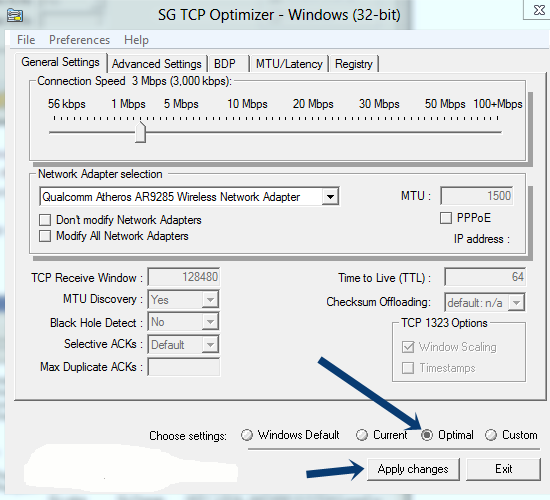
Is your internet speed connections is slow? Not to worry, now you can increase your internet speed by 20%. Lets see a trick to increase your internet speed by 20%
Increasing internet speed by 20%

Microsoft Windows from default, reserves 20% of your bandwidth for its own purpose like updating and intersection with your PC, etc.
IT KI DUNIYAA | Reading for information | Needs of All Students And learners
This can be done to enjoy 20% increase in internet speed. Follow the below step.

- First Click on start, then select run and their type “gpedit.msc”, hit enter.

- Now go to, LOCAL COMPUTER POLICY -> COMPUTER CONFIGURATION -> ADMINISTRATIVE TEMPLATES -> NETWORK -> CLICK ON QOS PACKET SCHEDULER -> LIMIT RESERVABLE BANDWIDTH

- Now double click on “Limit reservable bandwidth”

- Select “Enable” and edit Bandwidth limit to “0″, and then Apply
IT KI DUNIYAA | Reading for information | Needs of All Students And learners
Its an amazing trick, now don’t bother with slow speed of your internet, enjoy full speed!

You can also try TCP optimizer by changing TCP/IP settings for increasing internet speed

- First download SG TCP Optimizer and then open it. (This app doesn’t require any installation, it can run by just double clicking it)

Copy And Paste On Your Browser Search Bar And Download It
http://www.mediafire.com/download/yd8td25ojn25424/TCP+Optimizer+v3.0.8.rar

- After you open the app, we don’t have to change anything in General Settings Tab. Just select Optimal Settings and click Apply Changes
IT KI DUNIYAA | Reading for information | Needs of All Students And learners
- Now a new window will pop-up. Here also we will not change any settings, just (Tick Mark) Backup option and click OK
- Now you have to restart your PC/laptop to enable this settings. Enjoy fast and the furious Internet speed icon smile How To Increase Internet Speed

 For More Latest Tech Updates, Stay With Us On itkiduniyaa.blogspot.com
IT KI DUNIYAA | Reading for information | Needs of All Students And learners