Monday, January 13, 2014

Microsoft Operating Systems Short Keys

Microsoft O/S And Programs Short Keys

IT KI DUNIYAA | Reading for information | Needs of All Students And learners

Source:- Google.com.pk

What Is ShortCut Keys?

In computing, a keyboard shortcut is a set of one or several keys that invoke a software or operating system operation (in other words, cause an event) when triggered by the user. The meaning of term "keyboard shortcut" can vary depending on software manufacturer. For instance, Microsoft differentiates keyboard shortcuts from hotkeys (mnemonics) whereby the former consists of a specific key combination used to trigger an action, and the latter represents a designated letter in a menu command or toolbar button that when pressed together with the Alt key, activates such command.

ITKiDuniyaa Explains ShortCut Keys In Simple Words

In computing, a keyboard shortcut is a finite set of one or more keys that invoke a software or operating system operation when triggered by the user.

Keyboard shortcuts are typically an alternate means for invoking one or more commands that would otherwise be accessible only through a menu, a pointing device, different levels of a user interface, or via a command console. Keyboard shortcuts generally expedite common operations by reducing input sequences to a few keystrokes, hence the term "shortcut".

Shortcut keys help provide an easier and usually quicker method of navigating and using computer software programs. Shortcut keys are commonly accessed by using the Alt (on IBM compatible computers), command key (on Apple computers), Ctrl, and/or Shift in conjunction with a single letter.

MICROSOFT OPERATING SYSTEM AND PROGRAMS SHORT KEYS LIST

IT KI DUNIYAA | Reading for information | Needs of All Students And learners

Earlier this month i wrote about microsoft office shortcuts.Here some of the windows shortcuts are listed here.

General Keyboard Shortcuts

* CTRL+C (Copy)

* CTRL+X (Cut)

* CTRL+V (Paste)

* CTRL+Z (Undo)

* DELETE (Delete)

* SHIFT+DELETE (Delete the selected item permanently without placing the item in the Recycle Bin)

* CTRL while dragging an item (Copy the selected item)

* CTRL+SHIFT while dragging an item (Create a shortcut to the selected item)

* F2 key (Rename the selected item)

* CTRL+RIGHT ARROW (Move the insertion point to the beginning of the next word)

* CTRL+LEFT ARROW (Move the insertion point to the beginning of the previous word)

* CTRL+DOWN ARROW (Move the insertion point to the beginning of the next paragraph)

* CTRL+UP ARROW (Move the insertion point to the beginning of the previous paragraph)

* CTRL+SHIFT with any of the arrow keys (Highlight a block of text)

* SHIFT with any of the arrow keys (Select more than one item in a window or on the desktop, or select text in a document)

* CTRL+A (Select all)

* F3 key (Search for a file or a folder)

* ALT+ENTER (View the properties for the selected item)

* ALT+F4 (Close the active item, or quit the active program)

* ALT+ENTER (Display the properties of the selected object)

* ALT+SPACEBAR (Open the shortcut menu for the active window)

* CTRL+F4 (Close the active document in programs that enable you to have multiple documents open simultaneously)

* ALT+TAB (Switch between the open items)

* ALT+ESC (Cycle through items in the order that they had been opened)

* F6 key (Cycle through the screen elements in a window or on the desktop)

* F4 key (Display the Address bar list in My Computer or Windows Explorer)

* SHIFT+F10 (Display the shortcut menu for the selected item)

* ALT+SPACEBAR (Display the System menu for the active window)

* CTRL+ESC (Display the Start menu)

* ALT+Underlined letter in a menu name (Display the corresponding menu)

* Underlined letter in a command name on an open menu (Perform the corresponding command)

* F10 key (Activate the menu bar in the active program)

* RIGHT ARROW (Open the next menu to the right, or open a submenu)

* LEFT ARROW (Open the next menu to the left, or close a submenu)

* F5 key (Update the active window)

* BACKSPACE (View the folder one level up in My Computer or Windows Explorer)

* ESC (Cancel the current task)

* SHIFT when you insert a CD-ROM into the CD-ROM drive (Prevent the CD-ROM from automatically playing)

* CTRL+SHIFT+ESC (Open Task Manager)

IT KI DUNIYAA | Reading for information | Needs of All Students And learners

Dialog Box Keyboard Shortcuts

If you press SHIFT+F8 in extended selection list boxes, you enable extended selection mode. In this mode, you can use an arrow key to move a cursor without changing the selection. You can press CTRL+SPACEBAR or SHIFT+SPACEBAR to adjust the selection. To cancel extended selection mode, press SHIFT+F8 again. Extended selection mode cancels itself when you move the focus to another control.

* CTRL+TAB (Move forward through the tabs)

* CTRL+SHIFT+TAB (Move backward through the tabs)

* TAB (Move forward through the options)

* SHIFT+TAB (Move backward through the options)

* ALT+Underlined letter (Perform the corresponding command or select the corresponding option)

* ENTER (Perform the command for the active option or button)

* SPACEBAR (Select or clear the check box if the active option is a check box)

* Arrow keys (Select a button if the active option is a group of option buttons)

* F1 key (Display Help)

* F4 key (Display the items in the active list)

* BACKSPACE (Open a folder one level up if a folder is selected in the Save As or Open dialog box)

IT KI DUNIYAA | Reading for information | Needs of All Students And learners

Microsoft Natural Keyboard Shortcuts

* Windows Logo (Display or hide the Start menu)

* Windows Logo+BREAK (Display the System Properties dialog box)

* Windows Logo+D (Display the desktop)

* Windows Logo+M (Minimize all of the windows)

* Windows Logo+SHIFT+M (Restore the minimized windows)

* Windows Logo+E (Open My Computer)

* Windows Logo+F (Search for a file or a folder)

* CTRL+Windows Logo+F (Search for computers)

* Windows Logo+F1 (Display Windows Help)

* Windows Logo+ L (Lock the keyboard)

* Windows Logo+R (Open the Run dialog box)

* Windows Logo+U (Open Utility Manager)

IT KI DUNIYAA | Reading for information | Needs of All Students And learners

Accessibility Keyboard Shortcuts

* Right SHIFT for eight seconds (Switch FilterKeys either on or off)

* Left ALT+left SHIFT+PRINT SCREEN (Switch High Contrast either on or off)

* Left ALT+left SHIFT+NUM LOCK (Switch the MouseKeys either on or off)

* SHIFT five times (Switch the StickyKeys either on or off)

* NUM LOCK for five seconds (Switch the ToggleKeys either on or off)

* Windows Logo +U (Open Utility Manager)

IT KI DUNIYAA | Reading for information | Needs of All Students And learners

Windows Explorer Keyboard Shortcuts

* END (Display the bottom of the active window)

* HOME (Display the top of the active window)

* NUM LOCK+Asterisk sign (*) (Display all of the subfolders that are under the selected folder)

* NUM LOCK+Plus sign (+) (Display the contents of the selected folder)

* NUM LOCK+Minus sign (-) (Collapse the selected folder)

* LEFT ARROW (Collapse the current selection if it is expanded, or select the parent folder)

* RIGHT ARROW (Display the current selection if it is collapsed, or select the first subfolder)

IT KI DUNIYAA | Reading for information | Needs of All Students And learners

Shortcut Keys For Character Map

After you double-click a character on the grid of characters, you can move through the grid by using the keyboard shortcuts:

* RIGHT ARROW (Move to the right or to the beginning of the next line)

* LEFT ARROW (Move to the left or to the end of the previous line)

* UP ARROW (Move up one row)

* DOWN ARROW (Move down one row)

* PAGE UP (Move up one screen at a time)

* PAGE DOWN (Move down one screen at a time)

* HOME (Move to the beginning of the line)

* END (Move to the end of the line)

* CTRL+HOME (Move to the first character)

* CTRL+END (Move to the last character)

* SPACEBAR (Switch between Enlarged and Normal mode when a character is selected)

IT KI DUNIYAA | Reading for information | Needs of All Students And learners

Microsoft Management Console (MMC) Main Window Keyboard Shortcuts

* CTRL+O (Open a saved console)

* CTRL+N (Open a new console)

* CTRL+S (Save the open console)

* CTRL+M (Add or remove a console item)

* CTRL+W (Open a new window)

* F5 key (Update the content of all console windows)

* ALT+SPACEBAR (Display the MMC window menu)

* ALT+F4 (Close the console)

* ALT+A (Display the Action menu)

* ALT+V (Display the View menu)

* ALT+F (Display the File menu)

* ALT+O (Display the Favorites menu)

IT KI DUNIYAA | Reading for information | Needs of All Students And learners

MMC console Window Keyboard Shortcuts

* CTRL+P (Print the current page or active pane)

* ALT+Minus sign (-) (Display the window menu for the active console window)

* SHIFT+F10 (Display the Action shortcut menu for the selected item)

* F1 key (Open the Help topic, if any, for the selected item)

* F5 key (Update the content of all console wind

ows)

* CTRL+F10 (Maximize the active console window)

* CTRL+F5 (Restore the active console window)

* ALT+ENTER (Display the Properties dialog box, if any, for the selected item)

* F2 key (Rename the selected item)

* CTRL+F4 (Close the active console window. When a console has only one console window, this shortcut closes the console)

IT KI DUNIYAA | Reading for information | Needs of All Students And learners

Remote Desktop Connection Navigation

* CTRL+ALT+END (Open the Microsoft Windows NT Security dialog box)

* ALT+PAGE UP (Switch between programs from left to right)

* ALT+PAGE DOWN (Switch between programs from right to left)

* ALT+INSERT (Cycle through the programs in most recently used order)

* ALT+HOME (Display the Start menu)

* CTRL+ALT+BREAK (Switch the client computer between a window and a full screen)

* ALT+DELETE (Display the Windows menu)

* CTRL+ALT+Minus sign (-) (Place a snapshot of the entire client window area on the Terminal server clipboard and provide the same functionality as pressing ALT+PRINT SCREEN on a local computer.)

* CTRL+ALT+Plus sign (+) (Place a snapshot of the active window in the client on the Terminal server clipboard and provide the same functionality as pressing PRINT SCREEN on a local computer.)

IT KI DUNIYAA | Reading for information | Needs of All Students And learners

Microsoft Internet Explorer Navigation

* CTRL+B (Open the Organize Favorites dialog box)

* CTRL+E (Open the Search bar)

* CTRL+F (Start the Find utility)

* CTRL+H (Open the History bar)

* CTRL+I (Open the Favorites bar)

* CTRL+L (Open the Open dialog box)

* CTRL+N (Start another instance of the browser with the same Web address)

* CTRL+O (Open the Open dialog box, the same as CTRL+L)

* CTRL+P (Open the Print dialog box)

* CTRL+R (Update the current Web page)

* CTRL+W (Close the current window)

IT KI DUNIYAA | Reading for information | Needs of All Students And learners

Thursday, January 9, 2014

PalTalk Messenger Ports Forword Tutorials And Notes

Step By Step Guide To PalTalk Messenger Ports Forword For Routers And Servers

IT KI DUNIYAA | Reading for information | Needs of All Students And learners

Source:- Google.com.pk

What Are Ports?

Ports are virtual pathways on which information on the Internet travel. There are 65,536 ports to choose from. A good analogy is to think of ports like extensions on a phone sytstem.

What Is Port Forwarding?

Port forwarding is a method of making a computer on your network accessible to computers on the Internet, even though you are behind a router.

It is commonly used for hosting game servers, peer to peer downloading, and voice over IP type applications. There are many other reasons you may need to forward a port, this is not an exhaustive list.

What Are Some Commonly Used Ports?

Every program on your computer that uses the internet is programmed to send its packets through specific ports. Sometimes the ports are selected arbitrarily by the programmers of the software, but other times programmers will use a more standard port depending on the functionality of the software. Here are a few examples of industry standard uses for common ports:

    HTML pages: port 80
    FTP file transferring: port 21
    POP3 email: port 110
    MSN Messenger: port 6901 and ports 6891-6900


For more information on the ports that specific programs use, please see our Port Forwarding Ports List. There you will find the ports that you need to port forward for any application including Minecraft and uTorrent.

Define PalTalk Messenger?

Paltalk is a video group chat service that enables users to communicate via video, internet chat and voice. It offers chat rooms and the ability for users to create their own public virtual chat room. Paltalk is available in three formats: Paltalk Messenger, the regular version most users use, Paltalk Mobile, (iPhone, Android) the phone version, and Paltalk Express which is a flash version of the software targeted at non windows users.. It is proprietary software. While basic services are free of charge and basic software is free to download, fee-based memberships and payable upgrades to more capable paid versions are offered by AVM Software, the creators of Paltalk.

Paltalk appears to be profitable and has 5.5 million unique users.

Desktop (PC) Software

Paltalk's main application is 'Paltalk Messenger' for PC based computers, however they also offer PaltalkExpress, a free web based Adobe Flash and Java application which can be accessed using any Internet browser.

It has also been featured as one of the most popular communication apps in the Google Chrome Web Store. Paltalk Express delivers no PC-to-phone calls and no interoperability with IM services.

Paltalk has a widget called Paltalk Video Chat Widget that was released on May 12, 2009. It allows website visitors to view Paltalk rooms, both text and video. Users can now text-chat directly from the widget.

Paltalk Mobile & Tablet Apps

Paltalk has native apps available for multiple mobile platforms which allow users to publish webcam, audio chat and text chat many-many or in private sessions.

Android:

    Tablet app
    Smartphone app

Apple (iOS):

    iPad
    iPhone

All of these apps are available from the relative app store Paltalk and on Paltalk's app webpage where Paltalk also state a kindle app is in the works.

Features

Paltalk allows users to create chat rooms where they can text, voice, and video chat. These chat rooms can host hundreds and in some cases many thousands of chatters in one conversion. Chat rooms can be accessed via downloadable PC software, A flash version via their website, and their recently launched iOS, Android mobile & tablet apps.

Paltalk users can also have private video chat sessions with up to 15 other users.

Awards And Recognition

Paltalk has received many awards over the past decade:

    AlwaysOn 100 top Companies
    CNET Editor's pick
    The 2005 pulver 100

Legal Troubles

Paltalk filed a series of patent lawsuits in 2009 against video game developers claiming they were infringing US patents 5,822,523 and 6,226,686 "Server-group messaging system for interactive applications." Paltalk first brought a case against Microsoft, claiming Halo and Xbox Live violated its patent rights, and later settled out of court, despite Microsoft lawyers contending that Paltalk bought the patent for under $200,000.

Paltalk then moved on to Sony, Activision Blizzard, NCsoft, Jagex and Turbine, Inc., claiming that these companies are also violating Paltalk's patents whose damages range in the "tens of millions of dollars". This has sparked some controversy in the video gamer community as some of these companies are known for selling games for under USD $20, and Jagex provides a free version of RuneScape. In late 2010, Jagex successfully defended against such a lawsuit. Jagex's CEO made the following statement "It is exceedingly unfortunate that the U.S. legal system can force a company with a sole presence in Cambridge, UK to incur a seven-digit expense and waste over a year of management time on a case with absolutely no merit," he went on to say that Jagex "will not hesitate to vigorously defend our position against any patent trolls who bring lawsuits against us in the future."

In June 2013, it was revealed that Paltalk was targeted by the National Security Agency's PRISM surveillance program.

ITKiDuniyaa Explains PalTalk Messenger In Simple Words

Paltalk is an internet chat service for text, voice and video chatting. The Paltalk Messenger program is in a free, banner-supported format. It has an ad-free version that requires users to subscribe. Paltalk is only available to users of Microsoft Windows. The program now identifies itself as PaltalkScene, a change that was made in September 2007.

The company itself is a privately held New York based company founded in 1998. Paltalk claims 4 million users worldwide, making it the largest voice and video chat community on the World Wide Web. It also owns and operates HearMe, a video and voice-enabled web conferencing service that allows users to conduct group meetings. Paltalk became popular after Firetalk, an earlier voice/music chat program, became unable to maintain operation due to a lack of adequate funding.Paltalk users have the options to subscribe to different service levels as described below:

Black Nicks: Free service of Paltalk, called PaltalkScene Basic. People with black nicks have the ability to use the program for audio chat, publishing videos, transferring files, and can add up to 199 users in their Pal List. Users with black nicks have banner ads supporting Paltalk (meaning they will see ad banners in all chat Rooms/SuperIM (IM) Windows). Ability to join 3 voice rooms simultaneously.
Blue Nicks: Paid service called PaltalkScene Plus that gives the users the ability of audio chat, publishing videos, viewing streaming videos up to 6 cams simultaneously at up to 5fps stream rate, transferring files, ability to join 3 voice rooms simultaneously, and adding up to 499 members in their Pal List. Users with Blue Nicks have the option to enable/disable banner ads on the program.
Green Nicks: Paid service called PatalkScene Extreme that gives users the ability of audio chat, publishing videos, viewing as many cams as they may like with a stream rate up to 15fps, transferring files, and adding up to 999 members in their Pal List. Members with Extreme subscriptions can join up to 3 voice rooms simultaneously and have the option to enable/disable banner ads.
Purple Nicks: At the time that PalTalk version 9.0 was introduced, certain Paltalk Extreme members were given the opportunity to become "PalTalk VIPs". Members who accepted this change had their nicknames changed to purple, and their pal-profiles decorated with a purple star next to their nicks. However, aside from this there are no other obvious benefits or responsibilities associated with the new status. The only known method of obtaining a VIP nick is that the person must at the time be subscribed to the Extreme service. The criterion for keeping a purple nick once assigned is that the account must be kept paid up. Starting January 21, 2008, members can purchase purple nicknames. If one is already subscribed at the PaltalkScene Plus (with the purchase of the purple nick, becomes Extreme), or Extreme levels, their already subscribed service is overrun by VIP status.
Gold Nicks: Rooms with 1000+ members


Paltalk produces a number of original programs for its PaltalkScene platform including News Talk Online, Hollywood Now with Joanne Colan, MusicScene, etc. The hosted shows feature notable celebrities, politicians, musicians and entertainers that are able to interact live with the viewers through video chat. Guests have included Stephen King, Slash, JoJo, Lonestar, and casts of popular television shows and movies. Paltalk’s original programs are considered by many as examples of socialcasting. Diana Falzone and Barry 99 is the spokesman.


Paltalk has been featured in The Wall Street Journal, The New York Times, Forbes, The Dallas Morning News, The Atlanta Journal-Constitution, The Miami Herald, The Philadelphia Inquirer, New York Post, the British Broadcasting Corporation and CNET among others[citation needed].

As well as coverage by mainstream media. The shows have cameras set up in the studio and often talk about it on the show.IM on Steroids With Audio And Video] The company has also received publicity for hosting live chats with numerous celebrities and politicians including Reverend Jesse Jackson, Howard Zinn Barry 99 and Noam Chomsky hosted by The People Speak Radio Show, Dan Burstein, and family therapist Kim West a.k.a. “the Sleep Lady”.


The company came under fire from the British press in 2007, after a Shropshire man was urged by users to commit suicide live on his webcam. Kevin Whitrick, 42, from Wellington, Shropshire, was in an insult chat room with up to 60 other users, only one of which called the police after witnessing the hanging. Internet user Carol Vickers called the police after watching Mr Whitrick hang himself with an electrical cord, the others believing that Mr Whitrick was "playing a prank."

Mr. Whitrick's suicide is believed to be the UK's first suicide transmitted live to an audience. His ex-wife said he had been in a serious car crash in July 2006 and had never fully recovered.[citation needed]

The coroner called for the banning of "insult chatrooms". An insult chatroom is a chatroom where participants exchange insults with others within the room.


HearMe, acquired by Paltalk in 2001, and re-launched as a product in 2007, provides desktop voice and video conferencing in a scalable manner, allowing up to 2,000 simultaneous participants in each meeting "room".

Its capabilities include built-in VoIP, Desktop Sharing and Video

HearMe features:

Web Based Meeting Rooms

Invite and join meetings using Outlook
Create and access meetings quickly with a unique URL
Personalize the details displayed to your meeting attendees
Application/Desktop Sharing

Share any application, desktop, or file
Display PowerPoint and other presentations with animations and transitions
Broadcast and share pre-recorded video
Stream video from a webcam or camcorder
Transfer files to individual meeting participants
Send private text messages to meeting attendees
See Barry 99 on paltalk. The company has now released an online browser based version of PaltalkScene called Paltalk Express. The client requires Adobe Flash Player and Java to run. It has nearly all the features compared to PaltalkScene.

ITKiDuniyaa Explains PalTalk Messenger In Short Words

Paltalk is an internet chat service for text, voice and video chatting. The Paltalk Messenger program is in a free, banner-supported format. It has an ad-free version that requires users to subscribe. Paltalk is only available to users of Microsoft Windows. The program now identifies itself as PaltalkScene, a change that was made in September 2007.
The company itself is a privately held New York based company founded in 1998. Paltalk claims 4 million users worldwide, making it the largest voice and video chat community on the World Wide Web. It also owns and operates HearMe, a video and voice-enabled web conferencing service that allows users to conduct group meetings. Paltalk became popular after Firetalk, an earlier voice/music chat program, became unable to maintain operation due to a lack of adequate funding.

NOTES (PALTALK MESSENGER PORT FORWORD)

How To Open Ports When PalTalk Messenger Is Not Working

First of all make sure your computer is connected to the router and you dont have any firewall applications running like ZoneAlarm. Some antivirus applications can also have firewalls so better turn'em off while doing this if ur not sure.

 Application: PALTALK External port: 2090 Internal port: 2090 Protocol: TCP/UDP

Application: PALTALK1 External port: 2091 Internal port: 2091 Protocol: TCP/UDP

Application: PALTALK2 External port: 2095 Internal port: 2095 Protocol: TCP/UDP

PalTalk Messenger Port List

TCP 2090 file transfer
UDP 2090 voice stream
TCP 2091 video listening port
UDP 2091 control stream
TCP 2095 file transfer - (older versions)
Outbound ports
TCP 5001-5020 text messaging
TCP 8100-8700 firewall / network mode group voice
UDP 8100-8700 group voice
UDP 1024-2500 voice stream - user configurable
UDP 1024-2500 control stream - user configurable

PalTalk Port Forword Detail Method By ITKiDuniyaa

Firewalls and home networks

Most modern firewalls will simply prompt you that Paltalk is attempting to connect to the internet.  Select 'allow' or 'yes' and also be sure to select 'remember this decision' or 'always allow' to avoid being prompted every time you start Paltalk.

Due to the vast array of products, and combinations of products that you may be running on your system, we cannot give you help in this area beyond suggesting that you consult your documentation for configuration instructions or more help.  You may also want to check the manufacturers web sites.


A word about 'Firewall / Network support:
(box 6 under the sound controls tab under preferences)

This forces Paltalk into TCP/IP mode for group voice and should be used.


Standard IP range:
If you are behind a corporate firewall or on a private network, you may need your network administrator to 'open' or 'allow' a range of IP addresses and ports.

1. 199.106.211.53 port 5001
2. 199.106.234.10-127 ports 10000-30000, 5000-5013
3. 63.240.82.201-255 ports 10000-30000, 5000-5013
4. 63.240.117.100-255 ports 10000-30000, 5000-5013
5. 63.240.112.1-255 ports 10000-30000, 5000-5013
6. 64.40.12.1-255 ports 10000-30000, 5000-5013


Using a proxy server with Paltalk

Paltalk will NOT work thru a proxy server!  If you are a business and have the need to proxy into our service please contact our business development department to have your proxy added to our 'allowed' list.


Ports used for Paltalk

Paltalk uses 'outbound' connections which are easily handled by most 'off the shelf' home routers and firewalls.  You should be able to use multiple computers on your home network without doing 'port forwarding' or any configuration whatsoever.

For security reasons Paltalk uses a large range of 'rotating' ports and it is impractical to list them or to attempt to configure them.  If you are at a large corporation that blocks access to the outside world , most system administrators are unwilling to open ports to the outside world.  If your system administrator is willing to do so, here is a list of IP addresses and ports that must be allowed...

1. 199.106.211.53 port 5001
2. 199.106.234.10-127 ports 10000-30000, 5000-5013
3. 63.240.82.201-255 ports 10000-30000, 5000-5013
4. 63.240.117.100-255 ports 10000-30000, 5000-5013
5. 63.240.112.1-255 ports 10000-30000, 5000-5013
6. 64.40.12.1-255 ports 10000-30000, 5000-5013


If you are a business and have the need to proxy into our service please contact our business development department to have your proxy added to our 'allowed' list.

How To PalTalk Messenger Forward Ports On Router

IT KI DUNIYAA | Reading for information | Needs of All Students And learners
Login To The Router Using Your Web Browser

Open a web browser like Internet Explorer or Firefox. Enter the internal IP address of your router in the address bar of your browser.
IT KI DUNIYAA | Reading for information | Needs of All Students And learners
In the picture above the address bar has http://www.google.com in it. Just replace all of that with the internal IP address of your router. By default the IP address should be set to 192.168.1.1.
You should see a box prompting you for your username and password. Enter your username and password now.
The Default Router Username is: admin
The Default Router Password is: admin Or Password


Click the Ok button to log in to your Router.
Default Usernames and Passwords for other Routers
Please visit our Default Router Passwords page if the username and password shown below did not work for you.
If you can't login to your router because you forgot your Router username and password, use our How to Reset a Router Password guide to set your Router back to its factory settings.
IT KI DUNIYAA | Reading for information | Needs of All Students And learners
Now that you are logged in to your Router you should see the following:
IT KI DUNIYAA | Reading for information | Needs of All Students And learners
Click the Port Forwarding / Port Triggering link near the left of the page.
Put a dot into the Port Forwarding radio button.
Click the Add Custom Service button.
IT KI DUNIYAA | Reading for information | Needs of All Students And learners

Tuesday, January 7, 2014

Counter-Strike Online Gaming Ports Forword Tutorials And Notes

Step By Step Guide To Counter-Strike Online Gaming Ports Forword For Routers And Servers

IT KI DUNIYAA | Reading for information | Needs of All Students And learners

Source:- Google.com.pk

Define Counter-Strike?

Counter-Strike is a tactical first-person shooter video game developed by Valve Corporation which originated from a Half-Life modification by Minh "Gooseman" Le and Jess "Cliffe" Cliffe. By the fourth beta version, Valve Software, the developer who created Half-Life, began assisting in the development of Counter-Strike. In 2000, Valve bought the rights to Counter-Strike, and would publish the title for Microsoft Windows that year, and later in 2003 for the Xbox. OS X and Linux ports were available in January 2013.

The game has been expanded into a series since its original release, which currently includes Counter-Strike: Condition Zero, Counter-Strike: Source, and Counter-Strike: Global Offensive. Counter-Strike pits a team of terrorists against a team of counter-terrorists in a series of rounds. Each round is won by either completing the mission objective or eliminating the opposing force.

The game was the most played Half-Life modification in terms of players, according to GameSpy in 2008.

As of August 2011, the Counter-Strike franchise has sold over 25 million units.

Gameplay

Counter-Strike is a first-person shooter in which players join either the terrorist team, the counter-terrorist team, or become spectators. Each team attempts to complete their mission objective and/or eliminate the opposing team. Each round starts with the two teams spawning simultaneously.

A player can choose to play as one of eight different default character models (four for each side, although Counter-Strike: Condition Zero added two extra models, bringing the total to ten). Players are generally given a few seconds before the round begins (known as "freeze time") to prepare and buy equipment, during which they cannot attack or move (one notable exception is that a player may receive damage during freeze time. This happens when a map is changed to spawn players at a certain height above the ground, thus causing fall damage to the player. This is a method map designers use to alter the starting "HP" of players on a map). They can return to the buy area within a set amount of time to buy more equipment (some custom maps included neutral "buy zones" that could be used by both teams). Once the round has ended, surviving players retain their equipment for use in the next round; players who were killed begin the next round with the basic default starting equipment.

Standard monetary bonuses are awarded for winning a round, losing a round, killing an enemy, being the first to instruct a hostage to follow, rescuing a hostage or planting (Terrorist) /defusing (Counter Terrorist)the bomb(C4)in the bomb site.

The scoreboard displays team scores in addition to statistics for each player: name, kills, deaths, and ping (in milliseconds). The scoreboard also indicates whether a player is dead, carrying the bomb (on bomb maps), or is the VIP (on assassination maps), although information on players on the opposing team is hidden from a player until his/her death, as this information can be important.

Killed players become "spectators" for the duration of the round; they cannot change their names before their next spawn, text chat cannot be sent to or received from live players, and voice chat can only be received from live players and not sent to them (unless the console variable sv_alltalk is set to 1). Spectators are generally able to watch the rest of the round from multiple selectable views, although some servers disable some of these views to prevent dead players from relaying information about living players to their teammates through alternative media (most notably voice in the case of Internet cafes and Voice over IP programs such as TeamSpeak or Ventrilo). This form of cheating is known as "ghosting."

Development

Counter-Strike is itself a mod, and it has developed its own community of script writers and mod creators. Some mods add bots, while others remove features of the game, and others create different modes of play. Some mods, often called "admin plugins", give server administrators more flexible and efficient control over his or her server. There are some mods which affect gameplay heavily, such as Gun Game, where players start with a basic pistol and must score kills to receive better weapons, and Zombie Mod, where one team consists of zombies and must "spread the infection" by killing the other team (using only the knife). There are also the Superhero and mods which mix the first-person gameplay of Counter-Strike with an experience system, allowing a player to become more powerful as they continue to play. The game is also highly customizable on the player's end, allowing the user to install or even create their own custom skins, HUDs, spray graphics, sprites, and sound effects, given the proper tools.

Cheating

Counter Strike has been a prime target for exploitation by cheaters since its release. In-game, cheating is often referred to as "hacking" in reference to programs or "hacks" executed by the client.

    Wallhacks allows players to see through walls. These work by displaying objects that are normally obscured or by replacing opaque game textures with translucent ones. As the engine renders only the immediate area around the player, this does not allow a player to see the entire level at once.
    Speedhacks give the player increased foot speed. These work by sending false synchronization data to the server.
    No recoil removes any recoil (and thus improves accuracy) from a player's weapon.
    No spread is used to remove the random deviation normally experienced when the player shoots. This is similar to the recoil hack.
    Aimbots help the player aim at enemies, by auto-targeting other players. These work by using the game client library to calculate an enemy player's 2D coordinates from 3D space and automatically moving the player's mouse to the enemy target. It also consists of headshot aiming where a player shoots a bullet at the enemy which directly hits the enemy's head resulting in a one hit kill.
    ESP shows textual information about the enemy; such as health, name and distance; also information about weapons lying around the map, which could be missed without the hack. Most ESP cheats show info through walls.
    Barrel hack depicts an enemy's gaze as a visible line, this is also visible in the killcam.
    Anti-flash and anti-smoke remove the effects of the flashbang and smoke grenade. Implementation is derived from the wall hack.

    Unlimited HP and ammo are not hacks, but are server side modifications.
    Strafe hack allows players to jump longer, taking advantage of the source engine's strafe function, in which speed (or distance in this case) can be generated by strafing. A strafe hack strafes faster than humanly possible, as well as timing the A and D movement nearly perfectly with mouse movement.
    Bunnyhop script a script that causes the player to jump exactly when they hit the ground, this can be exploited along with strafing to gain an unreasonable amount of speed (bunnyhopping can commonly be mistaken as speed hacking, but bunnyhopping itself is not a hack. using a script to do so however, is). This can be done legitimately as well, but is not nearly as effective. Players can navigate a map in a fraction of what it would take normally via bunnyhopping.

Valve Anti-Cheat

Valve has implemented an anti-cheat system called Valve Anti-Cheat (VAC). Players cheating on a VAC-enabled server risk having their account permanently banned from all VAC-secured servers.

With the first version of VAC, a ban took hold almost instantly after being detected and the cheater had to wait 2 years to have the account unbanned.Since VAC's second version, cheaters are not banned automatically. With the second version, Valve instituted a policy of 'delayed bans,' the theory being that if a new hack is developed which circumvents the VAC system, it will spread amongst the 'cheating' community. By delaying the initial ban, Valve hopes to identify (and ban) as many cheaters as possible. Like any software detection system, some cheats are not detected by VAC and at times. Some servers implement a voting system, in which case players can call for a vote to kick or ban the accused cheater. VAC's success at identifying cheats and banning those who use them has also provided a boost in the purchasing of private cheats.These cheats are updated frequently to minimize the risk of detection, and are generally only available to a trusted list of recipients who collectively promise not to reveal the underlying design. Even with private cheats however, some servers have alternative anticheats to coincide with VAC itself. This can help with detecting some cheaters, but most paid for cheats are designed to bypass these alternative server-based anticheats.

Release

When Counter-Strike was published by Sierra Entertainment/Vivendi Universal Games, it was bundled with Team Fortress Classic, Opposing Force multiplayer, and the Wanted, Half-Life: Absolute Redemption and Firearms mods."

On March 24, 1999, Planet Half-Life opened its Counter-Strike section. Within two weeks, the site had received 10,000 hits. On June 19, 1999, the first public beta of Counter-Strike was released, followed by numerous further "beta" releases. On April 12, 2000, Valve announced that the Counter-Strike developers and Valve had teamed up.

Counter-Strike's primary beta release dates occurred on:


    Beta 1: June 19, 1999
    Beta 2: August 13, 1999
    Beta 3: September 14, 1999
    Beta 4: November 5, 1999
    Beta 5: December 23, 1999
    Beta 6: March 10, 2000
    Beta 7: August 26, 2000


The non-beta public release dates of Counter-Strike are as follows:


    Version 1.0: November 1, 2000
    Version 1.1: March 13, 2001
    Version 1.3: September 12, 2001
    Version 1.4: April 24, 2002
    Version 1.5: June 12, 2002
    Version 1.6: September 9, 2003


Note: Version 1.6 effectively coincided with the release of Valve Software's Steam content delivery system on September 12, 2003. All further updates and bug fixes have been dynamically delivered via Steam, without any specific new version numbers. The name or abbreviation "1.6" is often used to differentiate it from the later versions Counter-Strike: Source and Counter-Strike: Global Offensive.

In March 2007, Valve implemented mandatory advertisements through Steam in official maps and in the game's GUI overhead. Customers have expressed frustration with the ads, including an over 200 page thread on Valve's official forums, saying that they violate original terms of service and distract from the game.The thread was later deleted by an unknown moderator.

In January 2013, Valve began a Beta of 1.6 for targeting Linux and OS X users. The updates are available for Windows users via the Beta opt-in tab as part of the properties of the game within Steam.These changes were later rolled into an update of the standard (non-Beta) game in April 2013.

Reception

Counter-Strike received generally favorable reviews.The New York Times reported that E-Sports Entertainment ESEA League started the first professional fantasy e-sports league in 2004 around the game of Counter-Strike. Some credit the move into professional competitive team play with prizes as a major factor in Counter-Strike's longevity and success.

Controversy

Counter-Strike faced controversy in April 2007 when Jack Thompson, a now-disbarred attorney from Florida, predicted that the perpetrator of the Virginia Tech Massacre had been trained to kill in the game, well before Seung-Hui Cho (the shooter) was identified. News sources originally stated that Seung-Hui Cho only played the game in high school, however no video games whatsoever were found in the gunman's dorm room, and there is no evidence that he ever played Counter-Strike.Thompson also blamed Counter-Strike for the February 14, 2008 Northern Illinois University shooting perpetrated by Steven Kazmierczak on the day after the shooting. It is reported that Kazmierczak did play Counter-Strike in college.

On January 17, 2008, a Brazilian federal court order prohibiting all sales of Counter-Strike and EverQuest and imposing the immediate withdrawal of these from all stores began to be enforced. The federal Brazilian judge Carlos Alberto Simões de Tomaz, of the Minas Gerais judiciary section, ordered the ban in October 2007 because, according to him, the games "bring imminent stimulus to the subversion of the social order, attempting against the democratic and rightful state and against the public safety."The move has been described by media as a publicity stunt on the regulation of video game violence and sexually explicit content, and also as a hasty decision that ignored much more violent games. As all versions of Counter-Strike were very popular in Brazil at the time, the decision was met with considerable uproar by the Brazilian gaming community. Some media have reported that the game tested by the judge contained mods likening the scenario to Rio de Janeiro's favelas and adding Brazilian Military Police uniforms to player models, which might have worsened the case for Counter-Strike. The game's developer Valve did not comment on the episode. As of June 18, 2009, a regional federal court order lifting the prohibition on the sale of Counter-Strike was published. The game is now being sold again in Brazil.

Legacy

Counter-Strike: Condition Zero

Counter-Strike Game Counter-Strike: Condition Zero (also known by the abbreviation CS:CZ, CSCZ or just CZ) - continuation of the story of the famous Counter-Strike, designed for both single and multiplayer games. On the creation of Condition Zero, which has been mistaken for Counter-Strike 2, worked the game industry giants such as: Rogue Entertainment,Gearbox Software, Ritual Entertainment, Turtle Rock Studio itself Valve Software from 2002 to 2004. Condition Zero is a combination of the original Counter-Strike, new maps, weapons, improved textures, models, sounds, and gameplay. Taken from the Counter-Strike player models have been enhanced with new: kontrterroristov the camp, in addition to the existing SEAL Team 6, GSG 9, SAS and GIGN, was added Spetsnaz - Russian special forces, to their opponents joined by far-right extremist movement Midwest Militia, adding to the next row terrorist organizations: Phoenix Connexion, Elite Crew, Arctic Avengers and Guerilla Warfare. Some game items appeared in Counter-Strike 1.6 was originally presented only in Condition Zero, for example: weapons FAMAS, IMI Galil and Tactical Shield. No less pleasant addition to Condition Zero, is a new artificial intelligence hostages, who even rewarded them with emotions. They run away, if left unprotected, panicking when they hear shooting, "talk" with terrorists and special forces, can move around the map using the stairs, etc.

Counter-Strike: Source

Counter-Strike received a major technology update and refresh on November 1, 2004 with the release of Counter-Strike: Source, which was heavily updated using Valve's Source game engine to take advantage of more modern graphics and audio hardware. However, the original Counter-Strike is still available and played by many people via Steam, as the two variants are quite different, and some players prefer one variant over the other. Moreover, the system requirements of the original game are lower, which makes it accessible to a larger portion of the gaming populace. Both versions continue to co-exist today.

Counter-Strike Online

Counter-Strike Online is available in South Korea, Japan, Taiwan, China/Hong Kong, Singapore, Malaysia, Indonesia and Turkey and is now fully online. It is developed by Nexon Corporation with oversight from license-holder Valve Corporation, and is an attempt to increase market share of Valve's games in the Asian gaming market.

Counter-Strike: Global Offensive

Counter-Strike Global Offensive was the 5th release in the Counter-Strike Franchise.The game was built using the latest Source engine. Valve intended the game for casual and the competitive community. The game features more weapons, game mode and maps in the game.

NOTES (COUNTER-STRIKE PORT FORWORD)

How To Configure A Firewall Or Proxy Server For Counter-Strike

First of all make sure your computer is connected to the router and you dont have any firewall applications running like ZoneAlarm. Some antivirus applications can also have firewalls so better turn'em off while doing this if ur not sure.


Name: Counter Strike (27015) Primary: 27015 UDP Send/ReceiveSecondary: 27015-27050 UDP Receive & 7002 TCP Outbound
*** You will need one of these for each port you wish to play on as most game servers host more than one game, ie 27016, 27017 etc. You simply change the Primary port in each case and save under the name "Counter Strike (270xx) ***

Name: Counter Strike Secure Auth Primary: 27012 UDP Send/Receive
*** Although a posting on here suggested 27012 TCP, this will not work, it needs to be UDP. This will remove the "Error! Server verification failed" problem ***

Name: Counter Strike Server List Primary: 27010 UDP Send/Receive
*** You MUST install the Firewall Client, whether you like it or not, without it the game will not work. There may be a 'clever' way to get around this, but afaik there is not ***

Counter-Strike Port List

TCP Ports
27030-27039

UDP Ports
1200,27000-27015

Application: COUSTRKE External port: 1200 Internal port: 1200 Protocol: TCP/UDP

Application: COUSTRK1 Port range: 27000 - 27015 Protocol: TCP/UDP

Application: COUSTRK2 Port range: 27020 - 27039 Protocol: TCP/UDP

How To Counter-Strike Forward Ports On Router

IT KI DUNIYAA | Reading for information | Needs of All Students And learners
Login To The Router Using Your Web Browser

Open a web browser like Internet Explorer or Firefox. Enter the internal IP address of your router in the address bar of your browser.
IT KI DUNIYAA | Reading for information | Needs of All Students And learners
In the picture above the address bar has http://www.google.com in it. Just replace all of that with the internal IP address of your router. By default the IP address should be set to 192.168.1.1.
 You should see a box prompting you for your username and password. Enter your username and password now.
The Default Router Username is: admin
The Default Router Password is: admin


Click the Ok button to log in to your Router.
Default Usernames and Passwords for other Routers
Please visit our Default Router Passwords page if the username and password shown below did not work for you.
If you can't login to your router because you forgot your Router username and password, use our How to Reset a Router Password guide to set your Router back to its factory settings.
IT KI DUNIYAA | Reading for information | Needs of All Students And learners
Click the Forwarding link near the left of the page.
IT KI DUNIYAA | Reading for information | Needs of All Students And learners
You should now see a new menu. In this new menu, click Virtual Servers.
IT KI DUNIYAA | Reading for information | Needs of All Students And learners
Test if Your Ports are Open

Now that you have forwarded ports for Counter Strike - Source on the TP-Link TL-WR740N you should test to see if your ports are forwarded correctly.

To test if your port has been properly forwarded, you can use our Open Port Check tool. Our Open Port Check tool is the only online port checking tool with Guaranteed Results.
IT KI DUNIYAA | Reading for information | Needs of All Students And learners

Monday, January 6, 2014

Yahoo Messenger Ports Forword Tutorials And Notes

Step By Step Guide To Yahoo Messenger Ports Forword For Routers And Servers

IT KI DUNIYAA | Reading for information | Needs of All Students And learners

Source:- Google.com.pk

What Are Ports?

Ports are virtual pathways on which information on the Internet travel. There are 65,536 ports to choose from. A good analogy is to think of ports like extensions on a phone sytstem.

What Is Port Forwarding?

Port forwarding is a method of making a computer on your network accessible to computers on the Internet, even though you are behind a router.

It is commonly used for hosting game servers, peer to peer downloading, and voice over IP type applications. There are many other reasons you may need to forward a port, this is not an exhaustive list.

What Are Some Commonly Used Ports?

Every program on your computer that uses the internet is programmed to send its packets through specific ports. Sometimes the ports are selected arbitrarily by the programmers of the software, but other times programmers will use a more standard port depending on the functionality of the software. Here are a few examples of industry standard uses for common ports:

    HTML pages: port 80
    FTP file transferring: port 21
    POP3 email: port 110
    MSN Messenger: port 6901 and ports 6891-6900


For more information on the ports that specific programs use, please see our Port Forwarding Ports List. There you will find the ports that you need to port forward for any application including Minecraft and uTorrent.

Define Yahoo Messenger?

Yahoo Messenger (sometimes abbreviated YM) is an advertisement-supported instant messaging client and associated protocol provided by Yahoo. Yahoo Messenger is provided free of charge and can be downloaded and used with a generic "Yahoo ID" which also allows access to other Yahoo services, such as Yahoo Mail, where users can be automatically notified when they receive new email. Yahoo also offers PC-PC calls, PC-Phone and Phone-to-PC service was discontinued on 31 January 2013 file transfers, webcam hosting, text messaging service to some supported carriers, and chat rooms in various categories.

Yahoo Messenger was originally launched under the name Yahoo Pager on March 9, 1998.

In addition to instant messaging features similar to those offered by ICQ, it also offers (on Microsoft Windows) features such as: IMVironments (customizing the look of Instant Message windows, some of which include authorized themes of famous cartoons such as Garfield or Dilbert), address-book integration and Custom Status Messages.It was also the first major IM client to feature BUZZing and music-status. Another recently added feature is customized avatars.Yahoo Messenger also allows users to access Yahoo Chat Rooms.

As of December 14, 2012, all public chat rooms on Yahoo Messenger have been shut down as part of a series of features being changed/added/deleted.

Features

Calls

As of January 2014, the iOS version supports voice calls, with video calling on some devices. And the Android version supports "voice & video calls (beta)".

Voicemail and file sharing

Yahoo added voicemail and file sending capabilities to anyone. File-sharing of sizes up to 2GB was added to Yahoo Messenger.

Plug-ins

As of 8.0, Yahoo Messenger has added the ability for users to create plug-ins (via the use of the freely available Yahoo Messenger Plug-in SDK, which are then hosted and showcased on the Yahoo Plug-in gallery.Yahoo now no longer provides plugin development SDK.

Yahoo Music Radio

Yahoo Messenger users can listen to free and paid Internet radio services, using the official Yahoo Music Radio plug-in from within the messenger window. The plug-in also player functionality, such as play, pause, skip and rate this song.

Webcam

Yahoo's software now allows users with the most current updated versions (messenger 8 through 10) to utilize its webcam service. This option enables users from distances all over the world to view others who have installed a webcam on their end. The service is free with provided speeds averaging from a range in between 1 to 2 frames per second. The resolution of the images can be seen starting at 320 x 240 pixels or 160 x 120.

URI scheme

Yahoo Messenger's installation process automatically installs an extra URI scheme ("protocol") handler into some web browsers, so that URIs beginning "ymsgr:" can open a new Yahoo Messenger window with specified parameters. This is similar in function to the mailto: URI scheme, which creates a new e-mail message using the system's default mail program. For instance, a web page might include a link like the following in its HTML source to open a window for sending a message to the YIM user notarealuser:

<a href="ymsgr:sendim?notarealuser">Send Message</a>

To specify a message body, the m parameter is used, so that the link location might look like this: ymsgr:sendim?notarealuser&m=This+is+my+message

Other commands are:

    ymsgr:sendim?yahooid
    ymsgr:addfriend?yahooid
    ymsgr:sendfile?yahooid
    ymsgr:call?yahooid
    ymsgr:callPhone?phonenumber
    ymsgr:im - opens the "Send an IM" window
    ymsgr:customstatus?A+custom+status - changes the status message
    ymsgr:getimv?imvname - loads an IMVironment (example: ymsgr:getimv?doodle, ymsgr:getimv?yfighter)

Interoperability

On October 13, 2005, Yahoo and Microsoft announced plans to introduce interoperability between their two messengers, creating the second-largest real-time communications service userbase worldwide: 40 percent of all users (AIM currently holds 56 percent). The announcement comes after years of third-party interoperability success (most notably, Trillian, Pidgin) and criticisms that the major real-time communications services were locking their networks. Microsoft has also had talks with AOL in an attempt to introduce further interoperability, but so far, AOL seems unwilling to participate.

Interoperability between Yahoo and Windows Live Messenger was launched July 12, 2006. This allows Yahoo and Windows Live Messenger users to chat to each other without the need to create an account on the other service, provided both contacts use the latest versions of the clients. It wasn't possible to talk using the voice service among both messengers.

As of December 14, 2012, the interoperability between Yahoo Messenger and Windows Live Messenger ceased to exist. The Live Messenger contacts will appear as greyed out and it will not be possible to send instant messages to them.

Games

There are various games and applications available that can be accessed via the conversation window by clicking the games icon and challenging your current contact. It requires Java to work.

Yahoo Chat (1998–2012)

Yahoo Chat was a free online chat room service provided exclusively for Yahoo Users. Yahoo Chat was first announced on January 7, 1997, as it was confirmed to be a feature on the very first release of Yahoo Messenger. On March 9, 1998, the first public version of Yahoo Messenger was released, which included Yahoo Chat as one of its features. It allowed Yahoo Users to create public chat rooms, send private messages, and use emoticons.

In June 2005, with no advance warning, Yahoo disabled users' ability to create their own chat rooms. The move came after KPRC-TV in Houston, Texas reported that many of the user-created rooms were geared toward pedophilia. The story prompted several advertisers, including Pepsi and Georgia-Pacific, to pull their ads from Yahoo.

On November 30, 2012, Yahoo announced that among other changes that the public chat rooms would be discontinued as of December 14, 2012.quoting "This will enable us to refocus our efforts on modernizing our core Yahoo products experiences and of course, create new ones."

Until the chat rooms became unavailable on December 14, 2012, all versions of Yahoo Messenger could access Yahoo chat rooms.

Yahoo has since closed down the chat.yahoo.com site (which is now a redirect to a section of the Yahoo Messenger page) because the great majority of chat users accessed it through Messenger. The company is still working on a way to allow users to create their own rooms while providing safeguards against abuse. A greyed-out option to "create a room" was available until the release of version 11.

A recently added feature in Yahoo Messenger allows users to connect with their Facebook friends through the messenger.

SPIM

Yahoo Messenger users are subject to unsolicited messages (SPIM).Yahoo's primary solution to the issue involves deleting such messages and placing the senders on an Ignore List.As of 2007, it was estimated that at least 75% of all users who used Yahoo chat rooms were bots.Yahoo introduced a CAPTCHA system to help filter out bots from joining chat rooms, but such systems generally do little to prevent abuse by spammers.

Release history


    Windows - 11.5.0.228 - March 13, 2012
    Mac OS X - 3.0.1 Beta (build 35554) - January 10, 2011
    Unix - 1.0.4 - September 2003. It can still be downloaded from Softpedia.
        Version 1.0.6 can be downloaded from the Unix Beta page: http://public.yahoo.com/~mmk/

Yahoo released a preview version of Yahoo Messenger for Windows Vista. It had been designed to exploit the new design elements of Vista's Windows Presentation Foundation and introduced a new user interface and features. It lacked some basic functions such as webcam support. It has since been discontinued.

ITKiDuniyaa Explains Yahoo Messenger In Simple Words

Yahoo! is one of the Internet's leading search engines. It is also the largest Web portal, providing links to thousands of other websites. These links include sites from the Yahoo! Directory as well as news stories that are updated several times a day.

Besides being a portal and search engine, Yahoo! offers several other services as well. Some of these services include:

    Yahoo! Finance - stock quotes and financial information
    Yahoo! Shopping - online retail and price comparison services
    Yahoo! Games - online games playable over the Internet
    Yahoo! Groups - organized discussions among Internet users
    Yahoo! Travel - travel information and booking services
    Yahoo! Maps - maps and directions
    Yahoo! Messenger - instant messaging
    Yahoo! Mail - free Web-based e-mail

ITKiDuniyaa Explains Yahoo Messenger In Short Words

In 1998 Yahoo launched its own IM service under the name of Pager, later top be called Yahoo Messenger. With its 22 million users Yahoo Messenger is an advertisement-supported IM service. Users are required to have a Yahoo ID, which also enables you to use other Yahoo services. Features of Yahoo Messenger include PC-to-Phone calling, PC-to-PC calling, plug-ins, voicemail, file sharing, webcams, and chat rooms, client customization, and avatars. It recently incorporated Yahoo Mail into its IM service. The current version is 9.0 and supports interoperability with Windows Live Messenger.

NOTES (YAHOO MESSENGER PORT FORWORD)

How To Open Ports When Yahoo! Messenger Is Not Working

The Internet functions by utilizing ports on your computer to send and receive data. Many ports on your computer are left unprotected and the operating system even blocks some ports to prevent viruses and worms from spreading and afflicting other computers on any given network. Ports are usually open or closed, or even half-open. Opening a port can allow a program to function and run faster, as in the case with Yahoo! Messenger.

Instructions

1- Check all the different types of software and hardware that might be installed on your Internet connection that can prevent Yahoo! Messenger from accessing the Internet. This includes wireless and wired routers, hardware and software firewalls, Internet proxies and even the modem.

2- Check your firewall first and make sure the "ypager.exe" application and any application associated with Yahoo! Messenger is enabled to have unbridled access to the Internet. Firewall applications might have a section for port forwarding and port triggering; however, you can circumvent a lot of data entry by just giving the program full access. In Windows 7, click the Start menu and then type "firewall" into the search bar. Click the "Allow a program through Windows Firewall" application, and then find the Yahoo! Messenger instance under the allowed programs and features. Make sure Yahoo! Messenger is checked under both home/work private network and the public section.

3- Locate the wireless gateway key if your computer is connected to a wireless network. Make sure you have all the credentials to change the settings on the wireless router. Press the "Windows logo key" along with the "R" key on your keyboard to bring up the Run command window. Type in "CMD" and then press the "Enter" button.

4- Type in "ipconfig" and locate the number in the default gateway option. Copy these numbers into your internet browser. Press "Go" into your Internet browser and a username and password login page will show up. Insert your credentials or by default, insert "admin" into both fields. By default a router uses admin and admin as the username and password. If these don't work, check your router's manual for its default username and password.

5- Locate the ports or port forwarding sections in the wireless default gateway. Unlock the ports listed below. Chat and messenger functions can be unlocked by releasing the TCP on port 5050. Insider/Outsider room list functions can be unlocked by releasing the TCP on port 80. File transfer functions can be unlocked by releasing the TCP on port 80 for server access. Voice chat functions can be unlocked by releasing the TCP on port 5000-5001 and then UDP on port 5000-5010. Webcam functions can be unlocked by releasing the TCP on port 5100. Super webcam functions can be unlocked by releasing the TCP on port 5100. P2P instant messaging functions can be unlocked by releasing the TCP on port 5101.

6- Repeat these steps by connecting your computer directly to the modem and finding the default gateway of the modem. Find the ports on the modem and open them manually; all the ports that are mentioned in the above steps. You can also open ports in the firewall with the steps above as well.

How To Configure A Firewall Or Proxy Server For Yahoo Messenger

This article provides steps for configuring firewalls and proxy servers, which may help to resolve Yahoo Messenger connection issues, including the following symptoms:

    Unable to send or receive files or photos
    Unable to send or accept game or conference invitations
    Unable to sign in to Yahoo Messenger

If you're experiencing a problem because you are connecting through a firewall or proxy server, you may need to configure your firewall or proxy server.

Most Internet service providers (ISPs) don't have firewalls or proxies, but you should contact your network administrator or ISP for accurate information and for additional help with the configuration.

Some basic configuration procedures which may be helpful are listed below:

Basic Connection:

    Protocol: TCP or HTTP
    Servers: scs.msg.yahoo.com, scsa.msg.yahoo.com, scsc.msg.yahoo.com
    Port: 20, 23, 25, 80, 119, 5050, 8001, 8002

Webcam Connection:

    Protocol: TCP
    Server: webcam.yahoo.com
    Port: 5100

File Transfer Connection:

    Protocol: HTTP
    Server: filetransfer.msg.yahoo.com
    Port: 80

File Sharing Connection:

    Protocol: HTTP
    Port: 80

Voice Chat Connection:

    Protocol: UDP or TCP
    Server: vc.yahoo.com
    Ports: 5000-5010

Yahoo Messenger Port List

1. Yahoo! Voice Port #1
TCP
Port 5001
Outbound

2. Yahoo! Voice Port #2
TCP
Port 5000
Outbound

3. Yahoo! Voice Port UDP
UDP
Port 5000
Receive Send

4. Yahoo! WebCam Port 1
TCP
Port 5100
Outbound

5. Yahoo Messenger Chat Port
TCP
Port 5050
Outbound

6. Yahoo Voice Port UDP 2
UDP
Port 5000
Send Receive

7. Yahoo Webcam Port 2
UDP
Port 5050
Receive

8. Yahoo Webcam Port 3
UDP
Port 5050
Send

9. Yahoo Voice Port UDP 3
UDP
Port 5001
Send Receive

10.Yahoo Voice Port UDP 4
UDP
Port 5001
Send

11. Yahoo Voice Port UDP 5
UDP
Port 5001
Receive

12. Yahoo Voice Port UDP 6
UDP
Port 5001
Receive Send

How To Yahoo Messenger Forward Ports On Router

IT KI DUNIYAA | Reading for information | Needs of All Students And learners
Login To The Router Using Your Web Browser

Open a web browser like Internet Explorer or Firefox. Enter the internal IP address of your router in the address bar of your browser.
IT KI DUNIYAA | Reading for information | Needs of All Students And learners
In the picture above the address bar has http://www.google.com in it. Just replace all of that with the internal IP address of your router. By default the IP address should be set to 192.168.1.1.
You should see a box prompting you for your username and password. Enter your username and password now.
The Default Router Username is: admin
The Default Router Password is: admin


Click the Ok button to log in to your Router.
Default Usernames and Passwords for other Routers
Please visit our Default Router Passwords page if the username and password shown below did not work for you.
If you can't login to your router because you forgot your Router username and password, use our How to Reset a Router Password guide to set your Router back to its factory settings.
IT KI DUNIYAA | Reading for information | Needs of All Students And learners
Click the Forwarding link near the left of the page.
IT KI DUNIYAA | Reading for information | Needs of All Students And learners
You should now see a new menu. In this new menu, click Virtual Servers.
Click the Add New button near the center of the page.
IT KI DUNIYAA | Reading for information | Needs of All Students And learners
Forward Ports 5000-5001 on the Router

We will list a series of lines here that will show you exactly how to forward the ports you need to forward. Yahoo Messenger Chat requires you to forward the 5000-5001,5050 ports. Go ahead and enter the settings shown above into the Add or Modify a Virtual Server Entry menu and then click Save.
IT KI DUNIYAA | Reading for information | Needs of All Students And learners

Saturday, January 4, 2014

Installing And Configuring ISA Server 2000 On Windows Server 2003 Tutorials And Notes

Installing ISA Server 2000 On Windows Server 2003

IT KI DUNIYAA | Reading for information | Needs of All Students And learners

Source:- Google.com.pk

Define The ISA server?

ISA is stand for (Internet Security and Acceleration Server).ISA Server provides the two basic services of an enterprise firewall and a Web proxy/cache server. ISA Server's firewall screens all packet-level, circuit-level, and application-level traffic. The Web cache stores and serves all regularly accessed Web content in order to reduce network traffic and provide faster access to frequently-accessed Web pages. ISA Server also schedules downloads of Web page updates for non-peak times.


What does Internet Security and Acceleration Server (ISA Server) mean?

An Internet security and acceleration server (ISA server) is a server that provides organizational firewall and Web cache solutions for Windows along with secure, fast and manageable Internet connectivity.

ISA helps to implement an organization's business security policy through its administrative tools, which help to regulate usage based on user group, application, destination, schedule and content criteria. Its extensible platform offers hardware redundancy and load balancing and enables efficient use of network resources through its sophisticated caching mechanisms.


ITKiDuniyaa Explains Internet Security And Acceleration Server (ISA Server)

ISA server is a member of the .NET enterprise server. It comes in both a standard and enterprise edition. While the standard edition can be used as a stand-alone server (supporting up to four processors) for organizations with lesser access to the Internet, the enterprise edition is used for large-scale deployment due to its additional functionalities.

ISA server uses the following technologies for its services:

    Microsoft Firewall service to screen all packet-level, circuit-level and application-level traffic
    A Web proxy to store and serve regularly accessed Web content to reduce network traffic and provide faster access to frequently accessed Web pages
    Secure network address translation for providing address transparency to networked clients
    RAM caching and Cache Array Routing Protocol for advanced caching
    Dynamic Internet Protocol packet filtering to open ports only when needed, thus reducing the risk of external attack
    Virtual private networking for encapsulating private data over a public network
    Alerts to notify administrators about suspicious network events

Each of these ISA technologies can be applied individually or together to address the performance and security challenges faced by company branch offices in terms of accessing information stored on the main office network with improved security, reliability and accessibility.

How To Install ISA Server 2000 On Windows Server 2003

IT KI DUNIYAA | Reading for information | Needs of All Students And learners
Click On Install ISA Server & Enter Check Mark On Dont Display This Message Again And Press Continue
IT KI DUNIYAA | Reading for information | Needs of All Students And learners
Press Yes To Continue Setup
IT KI DUNIYAA | Reading for information | Needs of All Students And learners
Select Integrated Mode If You Want To Run ISA Server 2000 With Firewall Mode & Cache Mode Both
IT KI DUNIYAA | Reading for information | Needs of All Students And learners
Set Cache Disk Size As You Want [You Must Have NTFS File Formatted Partition To Make Cache]
IT KI DUNIYAA | Reading for information | Needs of All Students And learners
Press Construct Table Button
IT KI DUNIYAA | Reading for information | Needs of All Students And learners
Remove Check On 1st Option & Select Your NonGateway Routing Interface
IT KI DUNIYAA | Reading for information | Needs of All Students And learners
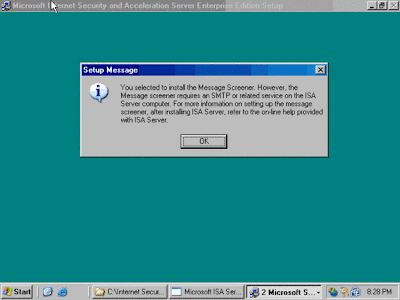
Press Ok To Install ISA Server 2000
IT KI DUNIYAA | Reading for information | Needs of All Students And learners
Press Ok To Run ISA Server 2000 & Close ISA Server Or Stop Services Then Install ISA Server Service Pack II Patch Now Your ISA Server 2000 Is Finish
IT KI DUNIYAA | Reading for information | Needs of All Students And learners