Friday, January 3, 2014

Change And Customize Windows Logon Screen Wallpaper Tutorials And Notes

Changing the Pre-Login Screen Background Picture

IT KI DUNIYAA | Reading for information | Needs of All Students And learners

Source:- Google.com.pk

How To Customize Windows XP Login Screen Without Using 3rd Party Tool Tutorial In Urdu

IT KI DUNIYAA | Reading for information | Needs of All Students And learners
Introduction Of Windows XP Logon Wallpaper
IT KI DUNIYAA | Reading for information | Needs of All Students And learners
Press Start Menu Button Then Click On Run Tool And Type Regedit & Follow This Tutorial
IT KI DUNIYAA | Reading for information | Needs of All Students And learners

How To Customize Windows 7 Login Screen without Using 3rd Party Tool

IT KI DUNIYAA | Reading for information | Needs of All Students And learners
Windows 7 makes it possible to change the welcome screen that appears when you start your computer without any third-party software, but this setting is well hidden. You can set any image you like as your background.

This setting is intended for original equipment manufacturers (OEMs) to customize their systems, but there’s nothing stopping you from using it yourself. All you have to do is change a single registry value and put an image file in the correct location.
IT KI DUNIYAA | Reading for information | Needs of All Students And learners
Enabling Custom Backgrounds

This feature is disabled by default, so you’ll have to enable it from the Registry Editor. You can also use the Group Policy Editor if you have a Professional version of Windows – scroll down a bit for the Group Policy Editor method.

Launch the Registry Editor by typing regedit into the search box in the Start menu and pressing Enter.
IT KI DUNIYAA | Reading for information | Needs of All Students And learners
In the Registry Editor, navigate to the following key:

    HKEY_LOCAL_MACHINE\SOFTWARE\Microsoft\Windows\CurrentVersion\Authentication\LogonUI\Background

You’ll see an DWORD value named OEMBackground. If you don’t see it, right-click in the right pane, point to the New submenu and create a new DWORD value with this name.
IT KI DUNIYAA | Reading for information | Needs of All Students And learners
Double-click the OEMBackground value and set its value to 1.
IT KI DUNIYAA | Reading for information | Needs of All Students And learners
Note that selecting a new theme in the Appearance and Personalization window will “unset” this registry value. Selecting a theme will change the value of the key to the value stored in the theme’s .ini file, which is probably 0 – if you change your theme, you’ll have to perform this registry tweak again.
IT KI DUNIYAA | Reading for information | Needs of All Students And learners
Changing the setting in group policy will allow it to persist even when you change your theme, but the Group Policy Editor is only available in Professional editions of Windows.

If you have access to the Group Policy Editor, launch gpedit.msc from the Start menu.
IT KI DUNIYAA | Reading for information | Needs of All Students And learners
Navigate to the following section in the Group Policy Editor window:

    Computer Configuration\Administrative Templates\System\Logon
IT KI DUNIYAA | Reading for information | Needs of All Students And learners
You’ll find a setting named “Always use custom login background.” Double-click it and set it to Enabled.
IT KI DUNIYAA | Reading for information | Needs of All Students And learners
Setting An Image

Your image file must be less than 256 KB in size. It’s also a good idea to use an image file that matches the resolution of your monitor, so it won’t look stretched.

Windows looks for the custom logon screen background image in the following directory:

    C:\Windows\System32\oobe\info\backgrounds

By default, the info and backgrounds folders don’t exist. Navigate to the C:\Windows\System32\oobe folder and create them yourself by right-clicking inside the folder, pointing to New, and selecting New Folder.
IT KI DUNIYAA | Reading for information | Needs of All Students And learners
Copy your desired background image to the backgrounds folder and name it backgroundDefault.jpg.
IT KI DUNIYAA | Reading for information | Needs of All Students And learners
(I can see the inevitable question coming in the comments, so if you like this wallpaper image, you can get it here.)

The change will take effect immediately – no system reboot required. The first time you log out or lock your screen (try the WinKey-L keyboard shortcut), you’ll see your new background.
IT KI DUNIYAA | Reading for information | Needs of All Students And learners

How To Customize Windows 7 Login Screen with 3rd Party Tool

IT KI DUNIYAA | Reading for information | Needs of All Students And learners

Copy And Paste On Your Browser Search Bar And Download It
http://www.mediafire.com/download/5rai1e0160m3k52/Win7+Logon+BackgroundChanger.zip

About Third-Party Tools

You don’t have to do this by hand. There are a variety of third-party tools that automate this process for you, like Windows Logon Background Changer, which we’ve covered in the past. Windows Logon Background Changer and other utilities just change this registry value and put the image file in the correct location for you.
Windows 7 Logon Background Changer

This cool app is free, Open Source, and lets you change the wallpaper on the Windows 7 Logon screen. It doesn’t require installation, and won’t change any of the system files. The download is a small zip file that contains an executable you can run from a flash drive, and also an installer in the Setup folder if you choose to install it.
IT KI DUNIYAA | Reading for information | Needs of All Students And learners
After launching Background changer, you can browse through the standard Windows backgrounds to get an idea of how it will look.
IT KI DUNIYAA | Reading for information | Needs of All Students And learners
If you don’t want to use the standard Windows backgrounds, you can add your own folder of images.
IT KI DUNIYAA | Reading for information | Needs of All Students And learners
After you’ve selected the background you want, click on the Apply button in the upper right hand corner.
IT KI DUNIYAA | Reading for information | Needs of All Students And learners
Click Yes on the authorization screen.
IT KI DUNIYAA | Reading for information | Needs of All Students And learners
Click Yes to User Account Control if it comes up.
IT KI DUNIYAA | Reading for information | Needs of All Students And learners
The wait a bit while the background is applied.
IT KI DUNIYAA | Reading for information | Needs of All Students And learners
Now you can log off to see how the new background will look when you or another user signs in.
IT KI DUNIYAA | Reading for information | Needs of All Students And learners
There are some different settings you can select like resetting back to the default pictures folder, preventing other users from changing the background, and adjust shadows.
Conclusion

There are several apps out there that will tweak the logon background, but this one from Julien Manici is one of the better ones that I’ve found. It’s easy to use and has a nice amount of features for tweaking the background. If you like to tweak and customize your Windows 7 interface, you’ll definitely want to take a look at this app.
IT KI DUNIYAA | Reading for information | Needs of All Students And learners

Thursday, January 2, 2014

Windows Server 2000 Active Directory Tutorials And Notes

Step By Step Guide To Install And Configure The Active Directory Of Windows Server 2000  All Editions

IT KI DUNIYAA | Reading for information | Needs of All Students And learners

Source:- Google.com.pk

What is Active Directory?

Active Directory is Microsoft's Directory Server. It provides authentication and authorization mechanisms as well as a framework within which other related services can be deployed (AD Certificate Services, AD Federated Services, etc). It is an LDAP compliant database that contains objects. The most commonly used objects are users, computers, and groups. These objects can be organized into organizational units (OUs) by any number of logical or business needs. Group Policy Objects (GPOs) can then be linked to OUs to centralize the settings for various users or computers across an organization.

What is a domain and what is a forest?

A forest is a security boundary. Objects in separate forests are not able to interact with each other, unless the administrators of each separate forest create a trust between them. For example, an Enterprise Administrator account for domain1.com, which is normally the most privileged account of a forest, will have, no permissions at all in a second forest named domain2.com, even if those forests exist within the same LAN, unless there is a trust in place.
If you have multiple disjoint business units or have the need for separate security boundaries, you need multiple forests.
A domain is a management boundary. Domains are part of a forest. The first domain in a forest is known as the forest root domain. In many small and medium organizations (and even some large ones), you will only find a single domain in a single forest. The forest root domain defines the default namespace for the forest. For example, if the first domain in a new forest is named domain1.com, then that is the forest root domain. If you have a business need for a child domain, for example - a branch office in Chicago, you might name the child domain chi. The FQDN of the child domain would be chi.domain1.com. You can see that the child domain's name was prepended forest root domain's name. This is typically how it works. You can have disjoint namespaces in the same forest, but that's a whole separate can of worms for a different time.

In most cases, you'll want to try and do everything possible to have a single AD domain. It simplifies management, and modern versions of AD make it very easy to delegate control based on OU, which lessens the need for child domains.

I can name my domain whatever I want, right?

Not really. dcpromo.exe, the tool that handles the promotion of a server to a DC isn't idiot-proof. It does let you make bad decisions with your naming, so pay attention to this section if you are unsure. (Edit: dcpromo is deprecated in Server 2012. Use the Install-ADDSForest PowerShell cmdlet or install AD DS from Server Manager.)

First of all, don't use made up TLDs like .local, .lan, .corp, or any of that other crap. Those TLDs are not reserved. ICANN is selling TLDs now, so your mycompany.corp that you're using today could actually belong to someone tomorrow. If you own mycompany.com, then the smart thing to do is use something like internal.mycompany.com or ad.mycompany.com for your internal AD name. If you use mycompany.com as an externally resolvable website, you should avoid using that as your internal AD name as well, since you'll end up with a split-brain DNS.

Domain Controllers and Global Catalogs:

A server that responds to authentication or authorization requests is a Domain Controller (DC). In most cases, a Domain Controller will hold a copy of the Global Catalog. A Global Catalog (GC) is a partial set of objects in all domains in a forest. It is directly searchable, which means that cross-domain queries can usually be performed on a GC without needing a referral to a DC in the target domain. If a DC is queried on port 3268 (3269 if using SSL), then the GC is being queried. If port 389 (636 if using SSL) is queried, then a standard LDAP query is being used and objects existing in other domains may require a referral.
When a user tries to log in to a computer that is joined to AD using their AD credentials, the salted and hashed username and password combination are sent to the DC for both the user account and the computer account that are logging in. Yes, the computer logs in too. This is important, because if something happens to the computer account in AD, like someone resets the account or deletes it, you may get an error that say that a trust relationship doesn't exist between the computer and the domain. Even though your network credentials are fine, the computer is no longer trusted to log into the domain.

Domain Controller Availability Concerns:

I hear "I have a Primary Domain Controller (PDC) and want to install a Backup Domain Controller (BDC)" much more frequently that I would like to believe. The concept of PDCs and BDCs died with Windows NT4. The last bastion for PDCs was in a Windows 2000 transitional mixed mode AD when you still had NT4 DCs around. Basically, unless you're supporting a 15+ year old install that has never been upgraded, you really don't have a PDC or a BDC, you just have two domain controllers.
Multiple DCs are capable of answering authentication requests from different users and computers simultaneously. If one fails, then the others will continue to offer authentication services without having to make one "primary" like you would have had to do in the NT4 days. It is best practice to have at least two DCs per domain. These DCs should both hold a copy of the GC and should both be DNS servers that hold a copy of the Active Directory Integrated DNS zones for your domain as well.

FSMO Roles:

    "So, if there are no PDCs, why is there a PDC role that only a single DC can have?"

I hear this a lot. There is a PDC Emulator role. It's different than being a PDC. In fact, there are 5 Flexible Single Master Operations roles (FSMO). These are also called Operations Master roles as well. The two terms are interchangeable. What are they and what do they do? Good question! The 5 roles and their function are:

Domain Naming Master - There is only one Domain Naming Master per forest. The Domain Naming Master makes sure that when a new domain is added to a forest that it is unique. If the server holding this role is offline, you won't be able to make changes to the AD namespace, which includes things like adding new child domains.

Schema Master - There is only one Schema Operations Master in a forest. It is responsible for updating the Active Directory Schema. Tasks that require this, such as preparing AD for a new version of Windows Server functioning as a DC or the installation of Exchange, require Schema modifications. These modifications must be done from the Schema Master.

Infrastructure Master - There is one Infrastructure Master per domain. If you only have a single domain in your forest, you don't really need to worry about it. If you have multiple forests, then you should make sure that this role is not held by a server that is also a GC holder unless every DC in the forest is a GC. The infrastructure master is responsible for making sure that cross-domain references are handled properly. If a user in one domain is added to a group in another domain, the infrastructure master for the domains in question make sure that it is handled properly. This role will not function correctly if it is on a global catalog.

RID Master - The Relative ID Master (RID Master) is responsible for issuing RID pools to DCs. There is one RID master per domain. Any object in an AD domain has a unique Security Identifier (SID). This is made up of a combination of the domain identifier and a relative identifier. Every object in a given domain has the same domain identifier, so the relative identifier is what makes objects unique. Each DC has a pool of relative IDs to use, so when that DC creates a new object, it appends a RID that it hasn't used yet. Since DCs are issued non-overlapping pools, each RID should remain unique for the duration of the life of the domain. When a DC gets to ~100 RIDs left in its pool, it requests a new pool from the RID master. If the RID master is offline for an extended period of time, object creation may fail.

PDC Emulator - Finally, we get to the most widely misunderstood role of them all, the PDC Emulator role. There is one PDC Emulator per domain. If there is a failed authentication attempt, it is forwarded to the PDC Emulator. The PDC Emulator functions as the "tie-breaker" if a password was updated on one DC and hasn't yet replicated to the others. The PDC Emulator is also the server that controls time sync across the domain. All other DCs sync their time from the PDC Emulator. All clients sync their time from the DC that they logged in to. It's important that everything remain within 5 minutes of each other, otherwise Kerberos breaks and when that happens, everyone cries.

The important thing to remember is that the servers that these roles run on is not set in stone. It's usually trivial to move these roles around, so while some DCs do slightly more than others, if they go down for short periods of time, everything will usually function normally. If they're down for a long time, it's easy to transparently transfer the roles. It's much nicer than the NT4 PDC/BDC days, so please stop calling your DCs by those old names.

how do the DCs share information if they can function independently of each other?

Replication, of course. By default, DCs belonging to the same domain in the same site will replicate their data to each other at 15 second intervals. This makes sure that everything is relatively up to date.

There are some "urgent" events that trigger immediate replication. These events are: An account is locked out for too many failed logins, a change is made to the domain password or lockout policies, the LSA secret is changed, the password is changed on a DC's computer account, or the RID Master role is transferred to a new DC. Any of these events will trigger an immediate replication event.

Password changes fall somewhere between urgent and non-urgent and are handled uniquely. If a user's password is changed on DC01 and a user tries to log into a computer that is authenticating against DC02 before replication occurs, you'd expect this to fail, right? Fortunately that doesn't happen. Assume that there is also a third DC here called DC03 that holds the PDC Emulator role. When DC01 is updated with the user's new password, that change is immediately replicated to DC03 also. When thee authentication attempt on DC02 fails, DC02 then forwards that authentication attempt to DC03, which verifies that it is, indeed, good, and the logon is allowed.

Let's Talk about DNS:

DNS is critical to a properly functioning AD. The official Microsoft party line is that any DNS server can be used if it is set up properly. If you try and use BIND to host your AD zones, you're high. Seriously. Stick with using AD Integrated DNS zones and use conditional or global forwarders for other zones if you must. Your clients should all be configured to use your AD DNS servers, so it's important to have redundancy here. If you have two DCs, have them both run DNS and configure your clients to use both of them for name resolution.

Also, you're going to want to make sure that if you have more than one DC, that they don't list themselves first for DNS resolution. This can lead to a situation where they are on a "replication island" where they are disconnected from the rest of the AD replication topology and cannot recover. If you have two servers DC01 - 10.1.1.1 and DC02 - 10.1.1.2, then their DNS server list should be configured like this:

    Server: DC01 (10.1.1.1)
    Primary DNS - 10.1.1.2
    Secondary DNS - 127.0.0.1

    Server: DC02 (10.1.1.2)
    Primary DNS - 10.1.1.1
    Secondary DNS - 127.0.0.1


Why do I want to use AD at all?

Because once you know what you're doing, you life becomes infinitely better. AD allows for the centralization of user and computer management, as well as the centralization of resource access and usage. Imagine a situation where you have 50 users in an office. If you wanted each user to have their own login to each computer, you'd have to configure 50 local user accounts on each PC. With AD, you only have to made the user account once and it can log into any PC on the domain by default. If you wanted to harden security, you'd have to do it 50 times. Sort of a nightmare, right? Also imagine that you have a file share that you only want half of those people to get to. If you're not using AD, you'd either need to replicate their username and passwords by hand on the server to give seemless access, or you'd have to make a shared account and give each user the username and password. One way means that you know (and have to constantly update) users' passwords. The other way means that you have no audit trail. Not good, right?

You also get the ability to use Group Policy when you have AD set up. Group Policy is a set of objects that are linked to OUs that define settings for users and/or computers in those OUs. For example, if you want to make it so that "Shutdown" isn't on the start menu for 500 lab PCs, you can do that in one setting in Group Policy. Instead of spending hours or days configuring the proper registry entries by hand, you create a Group Policy Object once, link it to the correct OU or OUs, and never have to think about it again. There are hundreds of GPOs that can be configured, and the flexibility of Group Policy is one of the major reasons that Microsoft is so dominant in the enterprise market.

ITKiDuniyaa Explains Windows Server 2000 All Edition Active Directory In Simple Words

Active Directory is Microsoft directory service that provides a diversity of network services. It is an integral part of the Windows 2000 architecture. It is a standardised and centralised system that automates network administration of user data, security, and distribution.

ITKiDuniyaa Explains Windows Server 2000 All Edition Active Directory In Short Words

A directory service from Microsoft that is a part of Windows 2000. It is an implementation of Internet standard directory and naming protocols that uses a database engine for transactional support, and also supports a variety of application programming interface standards.

How To install And Configure Active Directory Domain In Windows Server 2000 All Editions

IT KI DUNIYAA | Reading for information | Needs of All Students And learners
1st You Need A Partition Formatted With The Version Of NTFS
IT KI DUNIYAA | Reading for information | Needs of All Students And learners
Right Click On Local Area Connection & Press Properties
IT KI DUNIYAA | Reading for information | Needs of All Students And learners
Select Internet Protocol (TCP/IP) & Press Properties
IT KI DUNIYAA | Reading for information | Needs of All Students And learners
Enter IP Address & Must Enter Your IP Address In Preferred Dns
IT KI DUNIYAA | Reading for information | Needs of All Students And learners
Click On Dns Tab For Check Dns And Check Marks Then Press Ok
IT KI DUNIYAA | Reading for information | Needs of All Students And learners
Click On Start Button & Select Run And Enter Dcpromo
IT KI DUNIYAA | Reading for information | Needs of All Students And learners
Now Active Directory Wizard Apear On You Screen Press Next
IT KI DUNIYAA | Reading for information | Needs of All Students And learners
If You Make A New Domain So Select Domain Controller For A New Domain & Press Next
IT KI DUNIYAA | Reading for information | Needs of All Students And learners
If You Want To Make A New Tree So Select Creat A New Domain Tree & Press Next
IT KI DUNIYAA | Reading for information | Needs of All Students And learners
If You Make A New Forest Of Domain Trees So Select Creat A New Forest Of Domain Tress & Press Next
IT KI DUNIYAA | Reading for information | Needs of All Students And learners
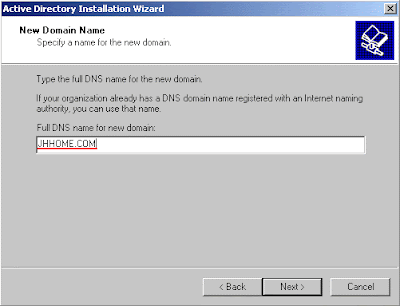
Enter Domain Name As You Like For Example 7star.com OR ssnet.com OR microsoft.com OR google.com & Press Next
IT KI DUNIYAA | Reading for information | Needs of All Students And learners
Wait A Few Second For Netbios Name Configuration After Wait Netbios Name Apear On Your Screen Then Press Next
IT KI DUNIYAA | Reading for information | Needs of All Students And learners
Database And Log Locations Is Apear Press Next
IT KI DUNIYAA | Reading for information | Needs of All Students And learners
Shared System Volume Screen Is Apear Press Next
IT KI DUNIYAA | Reading for information | Needs of All Students And learners
Active Directory Installation Wizard Popup Is Apear Press Ok
IT KI DUNIYAA | Reading for information | Needs of All Students And learners
Configure DNS Is Apear On Your Screen Select Yes To Install And Configure Dns Press Next
IT KI DUNIYAA | Reading for information | Needs of All Students And learners
Permissions Now Apear On Your Screen Select Permissions Compatible With Pre Windows 2000 Servers Option & Press Next
IT KI DUNIYAA | Reading for information | Needs of All Students And learners
Set Active Directory Password Then Press Next
IT KI DUNIYAA | Reading for information | Needs of All Students And learners
Now Active Directory Installation Wizard Apear On Your Screen Simply Press Next
IT KI DUNIYAA | Reading for information | Needs of All Students And learners
Now Apear Configuring Active Directory Screen Wait A Few Minuts...
IT KI DUNIYAA | Reading for information | Needs of All Students And learners
Now Apear Configuring Active Directory Screen Dont Skip This
IT KI DUNIYAA | Reading for information | Needs of All Students And learners
Enter Windows 2000 Server CD & Press Ok
IT KI DUNIYAA | Reading for information | Needs of All Students And learners
Now Apear Configuring Active Directory Screen Dont Skip This...
IT KI DUNIYAA | Reading for information | Needs of All Students And learners
Completing The Active Directory Installation Wizard Press Finish
IT KI DUNIYAA | Reading for information | Needs of All Students And learners
Now Apear Active Directory Restart Popup Press Restart Now
IT KI DUNIYAA | Reading for information | Needs of All Students And learners
After Restart Press Start Button > Setting > Control Panel > Administrative Tools Open Active Directory Users And Computers
IT KI DUNIYAA | Reading for information | Needs of All Students And learners
Follow This Diagram To Creat Users & Groups
IT KI DUNIYAA | Reading for information | Needs of All Students And learners

Wednesday, January 1, 2014

Djuice Friend Finder Messenger Error Solution Tutorials And Notes

Djuice Friend Finder Messenger

IT KI DUNIYAA | Reading for information | Needs of All Students And learners

Source:- Google.com.pk

Telenor Djuice Friend Finder Messenger Service For PC Application Has Been Blocked By Telenor Djuice

DJUICE FRIEND FINDER MESSENGER
Copy And Paste On Your Browser Search Bar And Download It
http://www.mediafire.com/download/ipq41t9iuo83d6i/Djuice+Friend+Finder+Messenger.rar

Djuice Friend Finder FAILED(HRESULT ERROR TOOL
Djuice Friend Finder Lost Connection And Reconnecting ERROR TOOL
Copy And Paste On Your Browser Search Bar And Download It
http://www.mediafire.com/download/34aypbgat7a6kpf/Msxml+4.0+Service+Pack+2.rar

IF U HAVE A SIM OF DJUICE (TELENOR)
THEN U CAN INSTALL DJUICE FRIEND FINDER MESSENGER. ITS A REAL FUN. YOU JUST HAVE A DJUICE SIM TO USE THIS MESSENGER.

APNI DJUICE SIM SE 'P' LIKH KAR 111 PE SEND KARAIN AP KA MOBILE NUMBER AP KA USER ID HO GA OR AP KO AP KA PASSWORD MESSEGE SE MOSOOL HO JAI GA

FOR EXAMPLE:
WRITE MESSEGE 'P' AND THEN SEND 111
DJUICE FNF ID : 03131234567
PASSWORD : 11111111

IT KI DUNIYAA | Reading for information | Needs of All Students And learners
Copy And Paste On Your Browser Search Bar And And Enjoy Djuice FNF Messenger Web Service
http://203.215.160.179:60601/sms_buddies_user_wap/

Now In 2014 Telenor Djuice Launch Djuice Friend Finder Web Service Alternate Of Djuice Friend Finder Messenger
IT KI DUNIYAA | Reading for information | Needs of All Students And learners
FAILED(hResult
IT KI DUNIYAA | Reading for information | Needs of All Students And learners
You Have Lost Your Connection With Server. Do You Wish To Reconnect?
IT KI DUNIYAA | Reading for information | Needs of All Students And learners